
THE SHORT VERSION
Minutes record decisions and actions.
Meeting minutes keep a record of what the group decided and what happens next. Include the meeting details, outcomes and agreed actions. The amount of discussion depends on the rules your group follows.
In our fictional script, the copy deadline changed from September 14 to September 16. Good minutes preserve that correction rather than create two deadlines.
Get the meeting minutes template ↓Free copy and plain-text download, no account required. The example is an editorial reconstruction of a fictional script, not new AI output or an approved meeting record.
01 / START WITH THE FIELDS
Copy or download the template
Select and copy the text below, or download the same blank minutes of meeting template as a text file. Replace the brackets. Keep fields that apply to your meeting and check your required format before removing any.
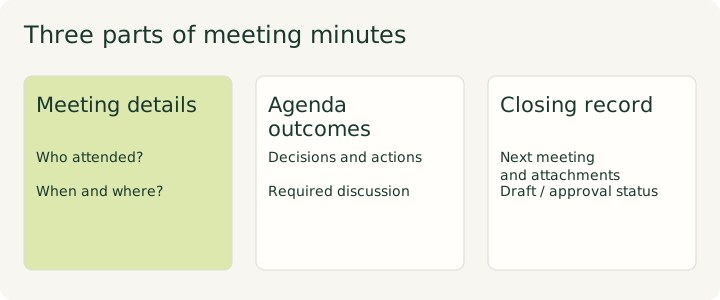
Download the plain-text template ↓
The download contains the same fields, without branding or tracking text. This page does not save your copy. The discussion and voting fields are prompts to check your rules, not a claim that every meeting needs every field.
02 / KEEP THE RECORD USEFUL
What to record (and what to leave out)
To decide what to include in meeting minutes, separate outcomes from your rough notes. Michigan State’s guidance (S4) calls for the exact wording of motions adopted or discarded, their outcomes and vote results. It also includes the presiding officer, agenda and previous-minutes approval, points of order, appeals and adjournment time.
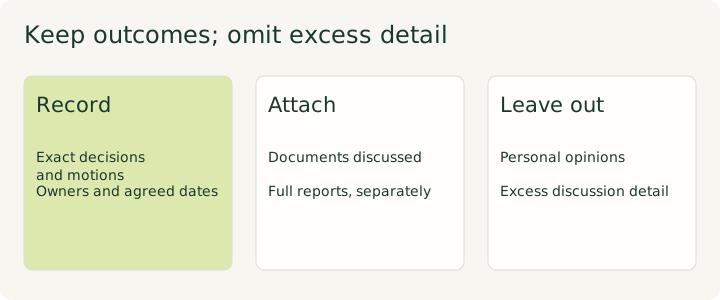
Texas A&M–Corpus Christi (S5) adds attendance, absences, guests and documents discussed. Follow the agenda headings, then record items in the order taken so a reader can follow the actual meeting. Write in the past tense and keep your own opinions out.
Keep full reports as attachments rather than copying them into the minutes. S4 excludes detailed discussion, personal opinions and withdrawn motions. S5 warns against excessive detail and sensitive or identifying student information. Check the audience before sharing attachments too.
The sources disagree about names
- S5: include who spoke, made a motion or approved.
- S4: name motion makers; seconders are optional. Record vote results without names unless called for.
- S3, Manchester: refer to office holders by title rather than naming individuals. It allows a strong objection to be recorded when the member requests it.
Choose the convention required by your group. Do not apply one institution’s naming practice to every meeting. For an informal action list, use the agreed owner so the person doing the work is clear.
03 / CHECK YOUR GROUP’S RULES
How much discussion belongs in the minutes?
There is no single discussion format across these sources. The official Robert’s Rules FAQ (S1) says: “Minutes are a record of what was done at a meeting, not a record of what was said”. It calls summarizing discussion “improper”.
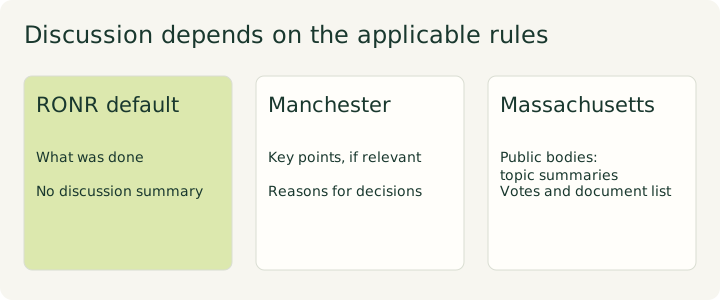
Manchester’s governance guide (S3) asks for key points that led to a decision, where appropriate. It also wants reasons and enough background for later reference. That is still a concise record, not a word-for-word transcript.
The Massachusetts Attorney General’s checklist (S2) applies to public bodies in Massachusetts. It requires a discussion summary for each subject, enough for an absent reader to understand what happened and how decisions were reached. It also requires decisions, votes, roll-call votes when taken that way, a list of documents used and the names of remote participants.
RONR itself describes its rules as defaults. Applicable law, bylaws and adopted special rules can take priority. Check the rules that apply to your group and its existing format first. For an informal team meeting, our suggested starting point is a decision, a short reason where useful, and named actions. Do not use that shortcut where fuller discussion records are required.
04 / A CHECKED EDITORIAL EXAMPLE
Worked example: minutes from our fictional client meeting
This meeting minutes example is our editorial reconstruction of the fictional client-call-01 script and answer key. Emma is the consultant; Liam is the client at Northstar Studio. The scenario date is September 7, 2026. We did not run a new AI minutes test or hold a real client meeting.
Draft internal minutes: Northstar Studio booking website
Meeting date: September 7, 2026.
Present in the script: Emma and Liam.
Start time, location, chair, minute-taker and approval of previous minutes: not specified.
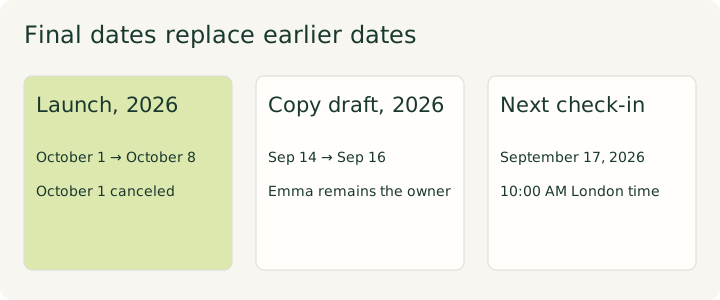
Launch and budget. The launch moved to October 8, 2026, because the photographs would not be ready for October 1. October 1 was canceled, not retained as another deadline. The confirmed project budget was $3,000.
Advertising, internal record only. Advertising was outside that budget. The possible $500 spend and any campaign were not approved. No ads were to be ordered.
Calendar and Spanish version. Emma agreed to check calendar integration feasibility by September 12. Support was not confirmed; alternatives would be discussed before selection if needed. Whether to include Spanish remained open, with no translation owner or deadline.
Copy and subscription. Emma’s copy draft was due September 16, replacing September 14. Liam would confirm the booking tool subscription plan by September 15 and send its name and limits. No annual purchase was agreed.
Next check-in. September 17, 2026, at 10:00 AM London time. Emma would send the invitation by September 8 to Liam only. Adjournment time and attachments were not specified.
These minutes show selected actions in context. The full meeting action items table holds all eight tasks, including wireframe delivery, consolidated feedback and brand assets. We do not invent a due date for Emma’s follow-up email.
The script permits the advertising discussion in internal notes but excludes it from the short client email. Our client meeting follow-up example shows that audience boundary. Copying internal minutes straight into an email would lose it.
05 / CHECK AGAINST THE SOURCE
Checking AI-generated minutes
Can ChatGPT create meeting minutes? You can ask AI for a draft from material you are allowed to share. A person still needs to check it. We have not tested ChatGPT minutes here; our evidence below comes from an existing Fireflies synthetic upload.
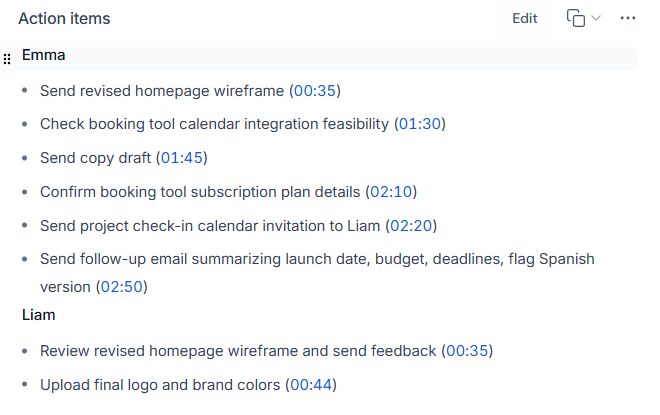
The screenshot puts subscription confirmation under Emma. The script assigns it to Liam, due September 15. This finding in our Fireflies AI review shows why a readable draft needs a source check. It does not measure accuracy for other tools or meetings.
- Owners: check who accepted each task.
- Corrected dates: replace the old date; do not add a second deadline.
- Amounts: keep unapproved spending out of confirmed decisions.
- Open questions: leave missing owners and dates unresolved.
- Scope: a feasibility check is not a promise that something works.
- Audience: check sensitive internal points before sharing.
If you record a meeting to help with minutes, S4 recommends asking attendees for consent and explaining the recording’s purpose. Plan that before recording, rather than treating a transcript as automatically available.
06 / FINISH THE RECORD
Approve, correct and share
Draft promptly while your notes are fresh; both S3 and S5 recommend this. We recommend labeling the document as a draft so readers can see its status. Manchester’s process asks the most senior officer present to review it before the chair signs it off for committee approval.
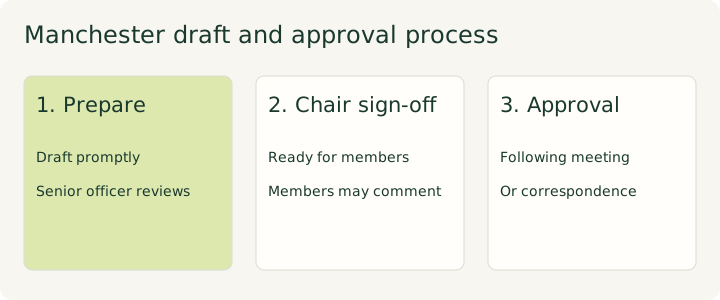
S3 normally sends minutes to the next meeting for formal approval, with correspondence as an option when meetings are far apart. After chair sign-off, it allows draft circulation to committee members for comments.
S5 asks for the draft at least one week before the next meeting. Its practice bars publication or sharing outside the committee or council until approval. It does not ban sending the draft to members for that approval process. Follow your group’s circulation rules rather than treating these timings as universal.
Under S1, corrections made during initial approval go into the text being approved. The current meeting’s minutes record the earlier minutes as approved as corrected, without listing each change. After approval, use the motion to Amend Something Previously Adopted. Do not silently rewrite the original approved record; the secretary may add a marginal note with the correction or a reference to its adoption.
Common questions
What is the difference between minutes and notes?
Working notes help you draft. Minutes form the concise meeting record: decisions, actions and the other details your rules require. S3 says minutes should not be a word-for-word account; S4 excludes detailed discussions and personal opinions.
Who should take minutes?
Assign a minute-taker before starting and record that role in your template. S1 says the secretary may add a marginal note after a correction to approved minutes. S3 separates drafting from senior-officer review, chair sign-off and committee approval.
Should minutes include names?
Check your group’s format. S5 includes speakers, movers and approvers; S4 names movers but leaves votes unnamed unless called for; S3 normally uses role titles. The Massachusetts checklist also requires remote participants’ names.
How soon should minutes be ready?
Draft as soon as possible under S3 and S5. S5 sends drafts at least a week before the next meeting. These are institutional practices, so check your own approval schedule.
Can AI write them for me?
AI can help draft; you must verify owners, final dates, decisions and sharing boundaries against the source. Our existing Fireflies example contains a task-owner error. We did not test a new AI minutes output for this guide.
Sources
- S1: Official Robert’s Rules FAQ, checked 19 October 2026.
- S2: Massachusetts AG public-body minutes checklist (November 2024), checked 19 October 2026 from a search excerpt; we could not open the full PDF.
- S3: University of Manchester: Minutes and actions, checked 19 October 2026.
- S4: Michigan State University: Writing Minutes, checked 19 October 2026.
- S5: Texas A&M–Corpus Christi: Best Practices for Taking Committee/Council Minutes, checked 19 October 2026.
- Our fictional test script: client-call-01, version 1.0, and its answer key; checked 19 October 2026. The original fictional input is reproduced in our review.