
OUR SHORTLIST
Which is the best CRM for your SaaS team?
Pipedrive is our first trial suggestion for a small SaaS team managing demos and proposals. In our limited test, it handled the deal, produced a readable follow-up draft and created the expected internal task through a configured rule. Choose HubSpot if a free place to start matters most, or shortlist Close if extracting clear actions from CRM notes is a priority.
These recommendations cover one fictional sales scenario in three real accounts. Pipedrive and Close used paid-tier trials; HubSpot used Free. They are not an equal-budget ranking or a test of every SaaS CRM.
Compare the three options ↓Provider links on this page are standard links without affiliate tracking. Our recommendations follow the evidence below.
Choosing between these two? Our Pipedrive vs HubSpot comparison puts the original test results, package limits and one- or five-user USD costs together, with a copyable trial scorecard.
01 / START WITH YOUR WORKFLOW
Three CRM options at a glance
Start with the job you need to do. All three saved our fictional contact, company and $2,400 opportunity. The differences appeared when we asked AI to read the note, prepare a recap and help with the next step.
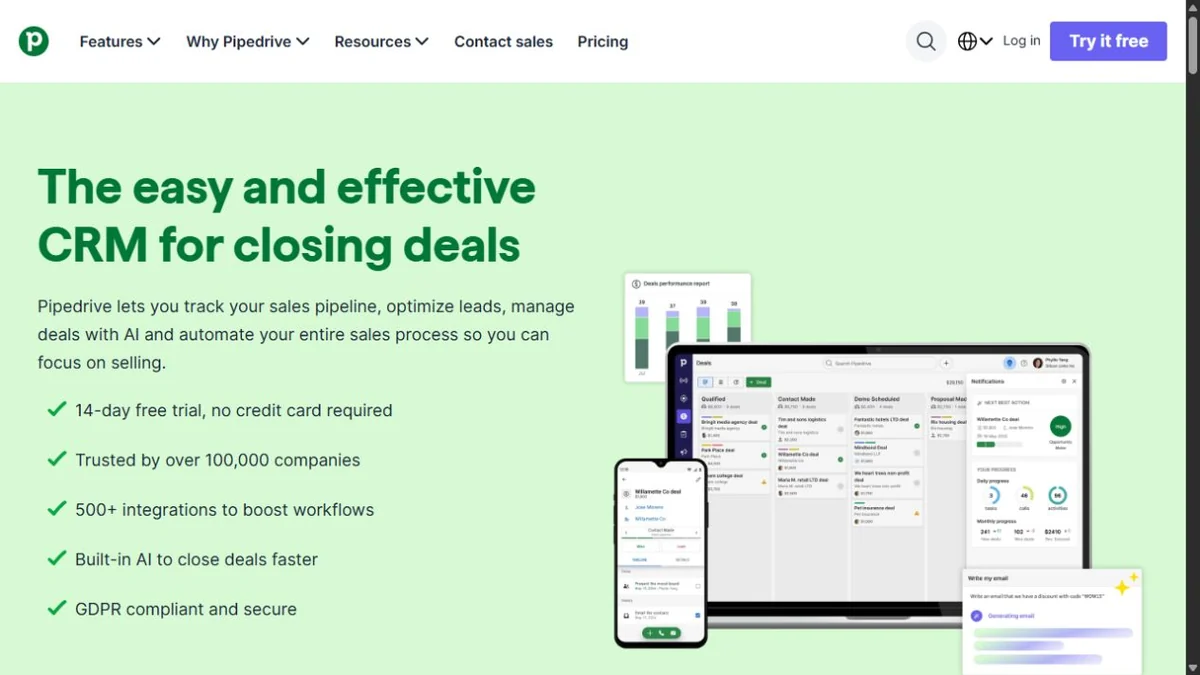
OUR FIRST TRIAL FOR DEMO FOLLOW-UP
Pipedrive
A focused deal-to-task route, with a usable chat draft in our test.
- Tested
- Premium trial · Sales Assistant beta
- Main drawback
- The draft still needed edits; trial AI access is not a promise for every plan.
- Price reference
- Growth: $39/user/month billed annually. See currency and package notes.
FREE START FOR MANUAL FOLLOW-UP
HubSpot
Our free account handled records, note retrieval and a manually assigned task.
- Tested
- Free account · Breeze Assistant
- Main drawback
- Automation was upgrade-gated; the recovered email lost the undated action’s owner.
- Price reference
- Free tools available. Paid costs depend on the product and seat configuration.
CLEAR ACTION EXTRACTION IN OUR CASE
Close
Chloe listed all four agreed actions, including the one with no deadline.
- Tested
- Scale trial · Chloe Chat beta
- Main drawback
- The email needed an extra prompt, omitted an open fee and inferred billing terms.
- Price reference
- Growth: $99/user/month billed annually, plus applicable usage.
Prices are reference points for plans advertising automation, not prices for identical AI capabilities. All displayed prices are in USD; plan capabilities still differ.
02 / PIPEDRIVE
Pipedrive: demo-to-proposal follow-up
We would start a Pipedrive trial when the immediate problem is keeping a small sales pipeline moving: store the conversation, check the commitments and put a dated next action against the deal. That recommendation comes from completing those steps, not from a measured improvement in sales or productivity.
In one form, we linked the fictional contact and company to an open $2,400 deal. Sales Assistant retrieved the saved note and retained all three dated actions, including the corrected September 11 deadline. It also found the pilot-user question with no deadline, although it placed that action under pending items.
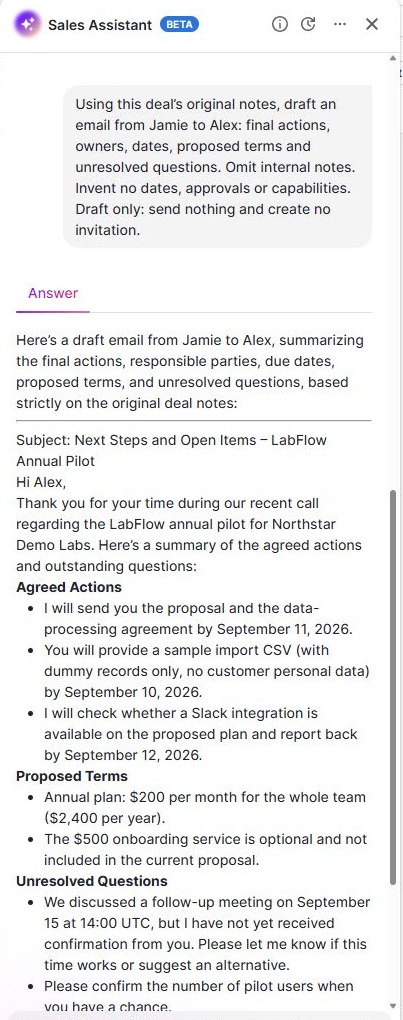
What worked
The customer recap preserved the dated actions, the team price and the unconfirmed meeting. It left out the internal discount. A separate rule then created one internal task for the next day after we changed the test deal’s stage.
What needed a second look
The recap described the $500 onboarding service as optional and outside the proposal. Our source was more precise: discussed, not approved, excluded from deal value. It also asked for pilot-user numbers “when you have a chance”; no deadline was invented, but the missing agreement deserved a clearer label.
Sales Assistant accepted only 300 characters in this session, so we asked it to retrieve the stored note. The draft came from that chat, not the native email composer.
Package check: Pipedrive lists workflow automation from Growth and native AI email creation from Premium. Our own test was on Premium with Sales Assistant beta. We did not repeat it on Growth. Opening the email tab on September 7 required a mailbox connection, so native composer output remains untested. Check Pipedrive’s plan comparison and AI feature requirements.
Choose it if: you want to evaluate a deal-focused process first. If a permanent free plan is essential, start with the HubSpot option below.
Our September 7 follow-up found that one non-matching title stopped the rule, while each of two matching stage re-entries created another task. See the repeat and exclusion controls. For the full setup walkthrough, plan calculations and a trial checklist, read our Pipedrive review.
03 / HUBSPOT
HubSpot: a free start with upgrade limits
HubSpot is our suggestion for a team that wants to begin with records and manual follow-up before paying for automation. Our Free account stored the contact, company, deal and original note. Breeze retrieved the note by deal name and returned the three dated actions correctly.
The important nuance was an agreed action without a deadline: Alex still needed to confirm the number of pilot users. Breeze placed it with unresolved proposals and said the items in that card were not definitive follow-up. The task was agreed; only its date was missing.
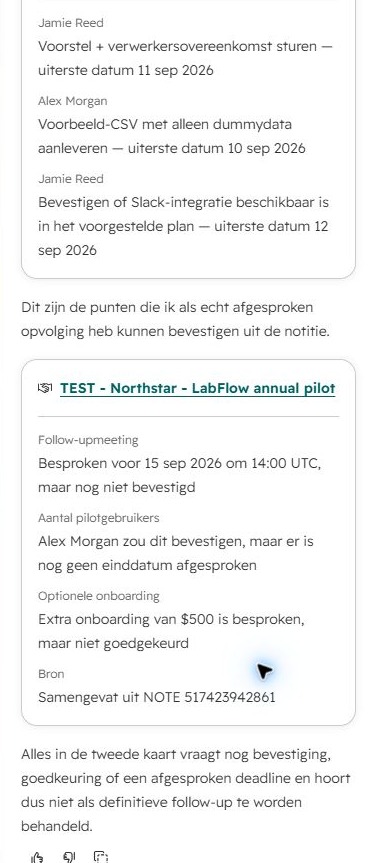
The recovered email needed one action clarified
The first canvas asked for an inbox connection. In a later September 7 check, we connected an authorized Gmail mailbox and read the original v1 artifact preview. It kept the three dated actions, proposed price, unapproved fee and unconfirmed meeting; the internal discount was absent. But pilot-user count appeared only as an open question, losing Alex’s ownership and the explicit missing deadline. See the original email screenshots and assessment.
The manual task worked
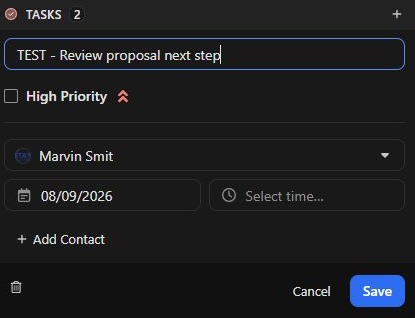
We saved the proposal-and-DPA task for September 11. The UI normalized an empty time to 00:00 GMT+2, so we documented that the conversation agreed only a date. The fictional business owner and actual account assignee were kept distinct.
The automation remained untested
Suggested automations and the workflow entry led to a paid upgrade. We did not purchase it. That is a limitation of the tested Free account, not evidence that HubSpot’s paid workflows cannot do the job.
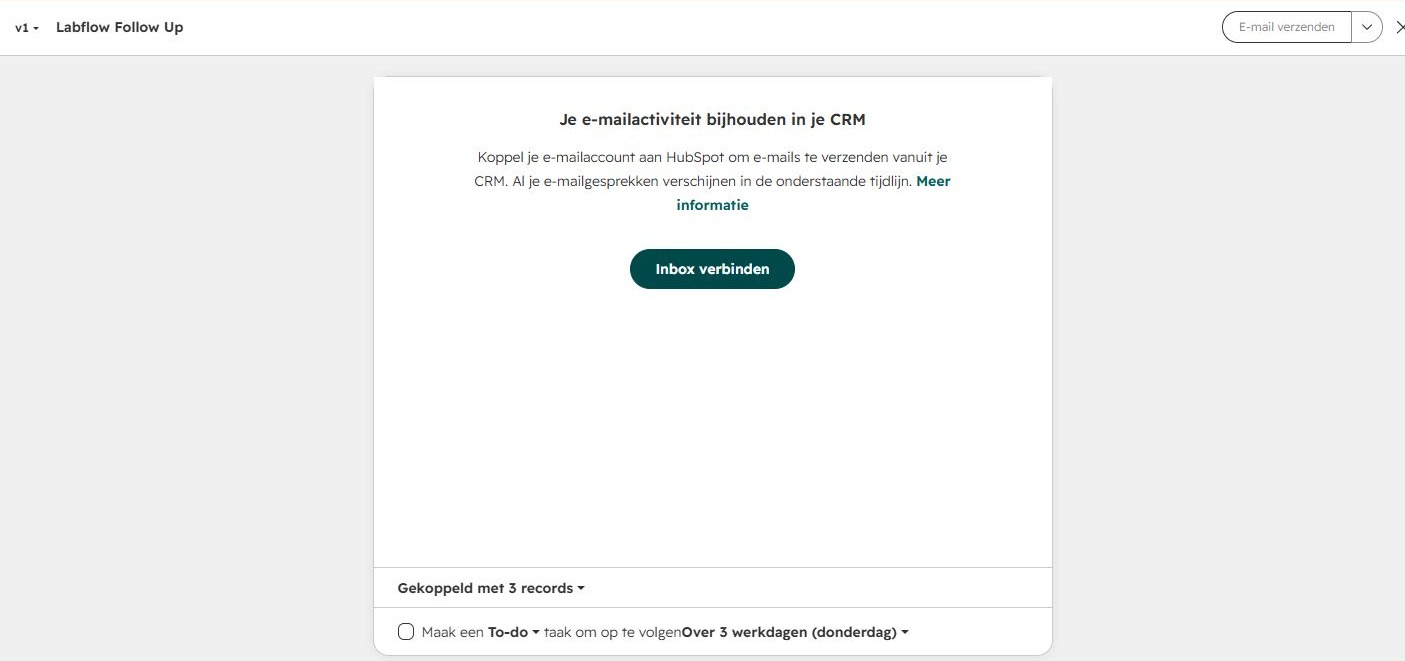
The public Free CRM page lists up to two users and 1,000 contacts. Our account instead displayed a 3,000-record allowance; records and contacts are different units, so we do not substitute one limit for the other. Confirm the limits in your offer.
For the detailed walkthrough, public free-plan limits and USD catalogue costs, read our HubSpot CRM review. It explains the account-specific packaging caveats and includes the three exact prompts.
04 / CLOSE
Close: action extraction and draft corrections
Close deserves a trial if you want to ask questions directly about saved CRM notes. In our Scale trial, Chloe put all four actions in its agreed-task table, correctly leaving the pilot-user deadline as “No deadline agreed.” It separated the unconfirmed meeting, Slack capability and onboarding service, and linked back to the lead.
The email request exposed a practical distinction. Jamie was a fictional salesperson, not an available sending identity. Chloe asked whether to save the draft under the real account owner. We instead requested plain text in chat.
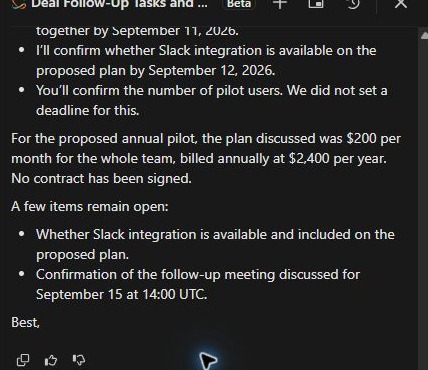
Two details to correct before sending
The full draft omitted the unresolved $500 onboarding service and added annual billing cadence to the stated annual plan value. It kept the task dates and excluded the internal discount, but those omissions and assumptions still needed review. The saved text also ended at “Best,” without Jamie’s name.
This was a generated chat answer. It did not create a task or send an email.
A separate configured workflow did create the expected internal task. We changed the isolated test opportunity to Proposal Sent, observed one finished run and checked the new task’s September 8 deadline. The workflow was then archived.

Package check: our Scale trial included features above the entry plans. Close’s public pricing places automated workflows from Growth. AI credits and communications usage also affect costs.
Our full Close CRM review walks through the record setup, all three prompts, workflow filters and USD costs for one or five users. It also explains why Chloe Chat and metered AI credits should be budgeted separately.
Connection caveat: the Google account appeared in settings but was disabled at our final check. We did not validate email or calendar sync, calling, or live meeting capture.
05 / WHAT THE TEST PROVED
Pipedrive vs HubSpot vs Close: observed results
| Check | Pipedrive Premium trial | HubSpot Free | Close Scale trial |
|---|---|---|---|
| Contact, company and deal | Saved and linked | Saved and linked | Saved and linked within a lead |
| Three dated actions | Correct owners and final dates | Correct owners and final dates | Correct owners and final dates |
| Action with no deadline | Found, under pending items | Found, but grouped as non-definitive follow-up | Agreed action; no deadline invented |
| Readable customer email | In chat; wording needed edits | Original preview recovered after Gmail setup; undated action owner omitted | In chat after extra prompt; fee omitted and billing inferred |
| Manual task due September 11 | Saved; date only | Saved; normalized to 00:00 GMT+2 | Saved; date only |
| Repeat and exclusion controls | One title excluded; two re-entries each added a task | Not tested | Not tested |
| Automatic next-day task | Three across initial run and two re-entries; rule deactivated | Not executed; upgrade required | One observed; workflow archived |
An AI answer is not a completed workflow. We first asked for read-only output, then created one representative task manually, then configured a separate automation where available. We did not claim the chat had created all four tasks.
Before putting meeting output into your CRM, verify it with our meeting action items template. If your starting point is a transcript, our Fireflies notes and action-item checks show why errors can begin before the CRM receives anything.
06 / BUDGET FOR THE RIGHT PACKAGE
What will a SaaS sales team actually pay?
USD list prices checked September 7, 2026. Annual totals are paid upfront. Pipedrive figures use its verified US annual offer; monthly-billed offers should be checked separately. Trial access does not establish a paid-plan entitlement.
| Plan | 1 user, monthly billing | 1 user, annual billing | 5 users, annual billing |
|---|---|---|---|
| Pipedrive Growth | Check monthly offer | $468/year $39/month equivalent | $2,340/year |
| Pipedrive Premium Tested tier | Check monthly offer | $708/year $59/month equivalent | $3,540/year |
| HubSpot Free Tested tier | Free | Free; no annual purchase | Exceeds the stated two-user free allowance; check a paid configuration |
| Close Growth | $109/month | $1,188/year $99/month equivalent | $5,940/year |
| Close Scale Tested tier | $149/month | $1,668/year $139/month equivalent | $8,340/year |
Totals are advertised unit rate × seats × 12, not checkout quotes. Annual billing is a yearly commitment; the monthly equivalent is not a month-to-month price. Sources: Pipedrive pricing, Close pricing and HubSpot Free CRM.
Get the full HubSpot configuration in one quote
HubSpot: our account showed a Core/Front Office packaging variant and Starter-labelled automation offers. That did not establish the paid configuration required for our exact workflow. We therefore leave its paid total unquoted rather than combining unrelated starting prices. Ask for the seat type, workflow entitlement, renewal rate and any required onboarding in one quote. Check the current Sales configuration.
For any plan, include the cost of the capabilities you will actually use: seats, connected accounts, AI allowances, communications usage and integrations. We did not benchmark paid consumption or approve a subscription.
07 / BEYOND THE DEMO
What to check in a CRM for a SaaS business
This guide covers a CRM used by a SaaS company selling through conversations and demos. If most customers activate and buy without a salesperson, this test alone cannot tell you which tool best handles product-led growth.
When your main need is a checked recap, use our client meeting follow-up email template. It works as a writing structure regardless of the CRM you choose.
08 / REPRODUCE THE CHECK
How we tested these three CRMs
On September 6–7, 2026, our AI assistant operated the available CRM interfaces in Marvin Smit’s test accounts. We used the same fictional SaaS notes, prepared the answer key first and kept it outside the tools. This was a browser-based exercise with one retrieval request and one initial email request per product, not a live customer meeting.
Pipedrive used Premium trial and Sales Assistant beta; HubSpot used Free and a Dutch interface; Close used Scale trial and Chloe beta. We adapted the demo stage to an existing equivalent where needed. Fictional seller Jamie was named in task text; the actual logged-in user owned the CRM task.
Open the original fictional meeting notes
Fictional demo call, September 7, 2026. Jamie Reed from LabFlow Demo spoke with Alex Morgan at Northstar Demo Labs.

The team is considering the annual plan at $200 per month for the whole team ($2,400 per year). No contract has been signed. A separate $500 onboarding service was discussed but not approved. Keep that optional fee out of the deal value. September 30 is our forecast close date, not a commitment from Alex.

Jamie initially offered to send the proposal on September 9. At the end of the call Jamie corrected this to September 11, 2026. Jamie will send the proposal and the data-processing agreement together by September 11.

Alex agreed to supply the sample import CSV by September 10, 2026. It should contain dummy records only, not customer personal data.

Jamie will check whether a Slack integration is available on the proposed plan and report back by September 12, 2026. Nobody confirmed that the integration works or that it is included.

We discussed a September 15 follow-up meeting at 14:00 UTC, but Alex has not confirmed the time. Do not create or send a calendar invitation yet.

Alex will confirm the number of pilot users. No deadline was agreed for this task.

Internal note for Jamie only: a 10% discount may be considered if necessary. It has not been offered or approved. Do not mention this internal note in the customer-facing recap.
Copy the exact record-retrieval prompt
Read the notes on the deal TEST - Northstar - LabFlow annual pilot. List the agreed follow-up tasks with their responsible people and final due dates. Flag unresolved proposals separately. Do not create, edit or send anything. Cite which deal or note you used if your interface supports sources.
Copy the exact initial email prompt
Using this deal’s original notes, draft an email from Jamie to Alex: final actions, owners, dates, proposed terms and unresolved questions. Omit internal notes. Invent no dates, approvals or capabilities. Draft only: send nothing and create no invitation.
See the extra prompts and test limitations
The prompts above retrieved saved CRM notes. We did not execute the longer pasted-notes variants of our initial protocol. Each email request followed retrieval in the same chat.
HubSpot: separate plain-text attempt
Show the full subject and email body here in chat as plain text. Do not use an email canvas or require an inbox connection. Use the original deal notes and the same drafting constraints. Do not send anything or create an invitation.
Close: separate plain-text attempt
Show the subject and full email body here in chat as plain text, written from fictional Jamie to fictional Alex. Do not create a CRM email draft, change the sender, send anything, or create an invitation. Keep all the constraints from my previous prompt.
At that stage HubSpot still directed us to the inbox-gated canvas; Close produced chat text. A later HubSpot Gmail-connection check let us inspect the original artifact preview without generating a new draft. These extra attempts are documented separately from the identical first prompts.
For automation, we matched the unique test deal title and proposal stage. Close stores that title in an opportunity note field, which we shortened for exact matching after the AI tests. The initial test produced one task in each paid-tier trial. A September 7 Pipedrive extension added one excluded-title control and two matching stage re-entries: zero, one and one new tasks respectively. Both rules are off. Close repeat controls, bulk imports, ongoing mailbox sync, recurring billing, security controls and integrations beyond HubSpot’s connection check remain untested; Pipedrive’s controls cover only the specific cases described. No fictional customer email or invitation was sent. During HubSpot Gmail setup, the product displayed an automatic connection-test email step.
Our complete software testing method explains how we preserve output and limit claims. Screenshots here are crops of the original interface; account controls have been excluded and product text has not been rewritten.
09 / COMMON QUESTIONS
Choosing your first SaaS CRM
Which CRM should a small SaaS startup try first?
For a team selling through demos and proposals, our first trial suggestion is Pipedrive. For a no-subscription start with manual follow-up, try HubSpot Free. If retrieving clear actions from account notes is central, include Close in the trial. Our recommendation is limited to the task and tiers tested here.
Can I start with a free CRM?
Yes. Our HubSpot Free account handled records, note retrieval and a manual task. It did not let us complete the automation test without an upgrade. The public free offer states two users and 1,000 contacts; confirm your account’s limits before importing a larger dataset.
Does an AI-generated action list create CRM tasks?
Not in our read-only prompt tests. The assistants returned text. We separately saved a manual task and configured a task-creation rule in Pipedrive and Close. Check for an actual task record, assignee and date rather than assuming the chat took action.
Is SaaS CRM the same as subscription billing software?
For this comparison, SaaS CRM means the system a SaaS sales team uses to manage accounts, deals and follow-up. We did not test invoicing, collections, subscription changes or financial reporting. Validate those needs separately and check the connection to your billing system.
Why are Attio, Salesforce and other tools absent?
We have not run this case in them. This is a shortlist of three tested options, not an exhaustive market ranking. Additional products need their own test evidence before we make the same kind of recommendation.
Sources and test dates
Original product tests: Pipedrive, September 6; HubSpot and Close, September 7, 2026. Pipedrive follow-up controls: September 7. Public feature documentation checked September 7. Pipedrive annual USD pricing and Close USD pricing checked September 7. Recommendations and interpretations are ours.
- Pipedrive plan features and pricing
- HubSpot Free CRM, Sales pricing and workflow documentation
- Close pricing and plan comparison
Product packaging and trial access can change. The captures document these sessions; they do not guarantee that a new account will have identical screens or offers.