
THE SHORT VERSION
Make each commitment checkable.
A meeting action item records a specific task, the person responsible, an agreed deadline and its current status. Add a source reference so someone can check the agreement later. When the meeting leaves a detail unresolved, record that gap instead of filling it with a guess.
Get the action items template ↓Free template, no account required. The worked example is our editorial reconstruction of a fictional conversation, not a new AI output or evidence that its tasks were completed.
01 / START HERE
Copy the meeting action items template
Use one row per task. The copy button uses tabs between columns: paste into cell A1 of a blank spreadsheet. If your spreadsheet puts everything into one column, import the CSV and select a comma separator. Replace the placeholders after pasting.
| ID | Action | Owner | Due date | Status | Source / notes |
|---|---|---|---|---|---|
| A1 | [Specific deliverable] | [Name] | [YYYY-MM-DD or date to confirm] | [Status to confirm] | [Meeting date, source reference, constraints] |
| A2 | [Specific deliverable] | [Name or owner to confirm] | [YYYY-MM-DD or date to confirm] | [Status to confirm] | [Meeting date, source reference, constraints] |
| A3 | [Specific deliverable] | [Name] | [YYYY-MM-DD or date to confirm] | [Status to confirm] | [Meeting date, source reference, constraints] |
Show plain-text version for manual copying
The CSV contains the same headers and three placeholder rows. It has no formulas, macros or automatic reminders. Your working copy lives wherever you save it; this page does not save task updates.
02 / SIX USEFUL FIELDS
What belongs in an action item?
To move this tracker into actual sales records, use the CRM task handoff example. It separates the customer’s commitment from the internal person tracking it.
Begin the task with a verb and describe an observable result. “Send the revised homepage wireframe” gives the owner something specific to deliver. “Website” is too broad to check.
- ID: keep a stable reference, such as A1, when a task carries over to another meeting.
- Action: include the actual deliverable and any constraint that changes its meaning. Checking whether an integration works is different from installing it.
- Owner: name the person who accepted responsibility. If that was not agreed, write “owner to confirm” and resolve it with the participants.
- Due date: use the final agreed date. Include a time zone when a specific time matters. An absent deadline stays “date to confirm”.
- Status: use a small shared set, such as Not started, In progress, Blocked and Done. Use “status to confirm” when you have no update.
- Source / notes: record the meeting date, a permitted transcript reference, dependencies and changes to the agreement. Restrict sensitive source material to the intended audience.
Owner, deadline and status fields also appear in Smartsheet’s action-item templates and Miro’s meeting action items template. We include a source column because checking the original conversation helped us resolve contradictions in our own test.
03 / A WORKED EXAMPLE
Eight action items from one client meeting
Our fictional scenario has Emma working with client Liam on a booking website. The conversation is set on September 7, 2026; we ran the synthetic test on September 6. The dates below belong to that scenario. We reconstructed these rows from the script and answer key, rather than copying the AI task list unchanged.
| ID | Action | Owner | Due date | Important detail |
|---|---|---|---|---|
| A1 | Send revised homepage wireframe | Emma | 2026-09-09 | Deliver the revised version. |
| A2 | Send consolidated wireframe feedback | Liam | 2026-09-11 | One consolidated set of comments. |
| A3 | Upload logo and final brand colours | Liam | 2026-09-10 | Include both assets. |
| A4 | Check calendar integration feasibility | Emma | 2026-09-12 | Support is not yet confirmed. |
| A5 | Send copy draft | Emma | 2026-09-16 | Replaces September 14. |
| A6 | Confirm subscription plan name and limits | Liam | 2026-09-15 | No annual purchase was agreed. |
| A7 | Send check-in invitation | Emma | 2026-09-08 | Invite Liam only; check-in September 17, 10 AM London time. |
| A8 | Prepare client follow-up | Emma | Date to confirm | Include confirmed facts and the open Spanish question; omit internal-only discussion. |
Completion status is unknown for every row. The test records commitments, not subsequent work. The example CSV therefore uses “Status to confirm” throughout.
Download this fictional example as CSV ↓Keep decisions and open questions separate
The October 8 launch date is a confirmed project decision. Whether to include a Spanish version remains an open question with no agreed owner or deadline. Neither needs to become an invented task such as “Liam delivers Spanish copy by October 8”. Record the decision and question alongside the tracker, then add a task only when someone agrees to do the work.
04 / WHY WE CHECK THE SOURCE
A plausible task can still have the wrong owner
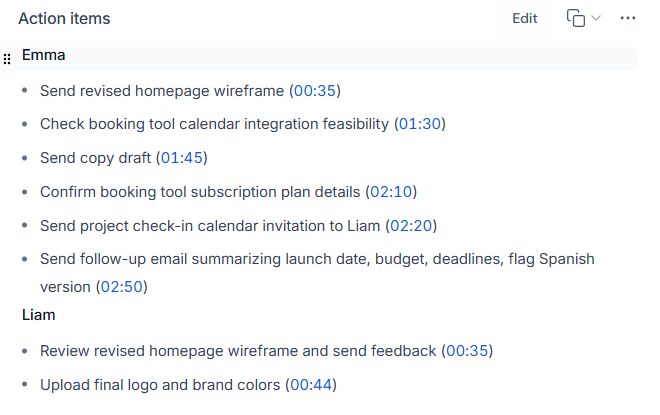
The first Fireflies action list put subscription-plan confirmation under Emma. Our script assigned it to Liam, due September 15. A neat table would not have fixed that error by itself: we needed to check who actually accepted the task.
The same source also changed the copy deadline from September 14 to September 16. Keep the final agreement in the Due date column and preserve the replaced date in notes if it helps explain the change. Do not leave both dates looking equally current.
These are specific findings from a small synthetic pilot. Our Fireflies AI review shows the original notes and action items, plus a separate second recording and the limits of that comparison. This guide does not add another product test.
Moving these actions into a sales system? See our CRM task and automation tests: an AI action list did not by itself create CRM tasks.
05 / AFTER THE MEETING
Keep the action tracker useful next week
- Confirm the initial rows. Ask participants to check their own actions, dates and dependencies. Resolve “owner to confirm” before treating a task as assigned.
- Update the existing row. Carry A1 into the next meeting with the same ID. Add the update date and reason if the deadline changes; keep the original commitment visible in notes.
- Describe the blocker. “Blocked: waiting for approved logo” is more useful than changing a missed deadline without explanation. Identify the next decision or dependency.
- Close with evidence. Mark a task Done when its agreed deliverable has been confirmed. Add the completion date and a suitable link or note.
For the client-facing message, use our copyable meeting follow-up email. The email communicates the agreed next steps; the tracker keeps their later status in one place. Check the audience before including internal notes or links.
Need a record of the decisions around these tasks? Use our meeting minutes template to keep outcomes and approval together.
Meeting action items template questions
Can I use this template in Excel or Google Sheets?
The template is plain tab-separated text and the download is a standard comma-separated CSV. Paste the copied table into a blank sheet, or import the CSV and choose comma as the separator. It contains no app-specific formulas, formatting or reminders.
What if an action has no deadline?
Record “date to confirm” and ask for an agreed date. Keep a proposed date clearly labelled as proposed until it is accepted. A meeting date or transcript timestamp is not a task deadline.
Should every discussion point become an action item?
No. Keep confirmed decisions and unresolved questions separate. Add a task when the conversation establishes work to be done; show missing ownership or timing explicitly.
Can I use AI to fill in this table?
You can use AI to draft rows from notes you are allowed to share with the tool. Check each owner, final date and constraint against the source before treating the table as agreed. Our example demonstrates an ownership error that survived into a readable task list.