
THE SHORT VERSION
A follow-up needs a person beside each promise.
A useful meeting follow-up email states what was decided, who will do each task, when it is due, and what remains open. Compare those details with the source conversation before sending. A fluent draft can still leave responsibility unclear.
In our first AskFred draft, all seven agreed task dates appeared, but five of six deliverables had no explicit owner. This guide shows how we checked that answer and turned the same fictional conversation into a clearer email.
One prompt on one 3:38 synthetic recording. The people and project are fictional. Our corrected version below is an editorial example, not a second AI output. No email was sent.
01 / GET THE INPUT RIGHT
How to write a meeting follow-up email from notes
- Collect the final decisions. Separate an agreed decision from a suggestion, rejection or open question. If a date changed, keep the replacement date.
- List actions with owners and deadlines. Use names, not an ambiguous “we.” If nobody agreed a date or owner, mark it as unresolved rather than filling it in.
- Separate internal discussion from client-facing information. Identify what the conversation says to leave out.
- Draft the email. Keep the subject specific, summarize the decisions, then list actions and open questions.
- Check against the source. Review the recording or transcript, then verify the recipients and the exact text you intend to send.
For our example, Emma and Liam changed a website launch to October 8 and the copy deadline to September 16. Other tasks had named owners and dates. Spanish remained undecided, and the calendar integration was only a feasibility check. You can read the full fictional input script.
02 / ASK FOR A DRAFT
The exact prompt we used in Fireflies
We entered this once in AskFred on the original recording. We did not supply our answer key, regenerate the answer or connect an email account.
Show the original tested prompt
Using only this meeting, draft a client-facing follow-up email from Emma to Liam. Include agreed actions, owners, final due dates and open questions. Respect any instructions in the conversation about what should be excluded. Do not send the email.
This prompt requests a draft and names the checks we care about. It does not guarantee that the answer will satisfy them. Treat the result as something to inspect.
03 / INSPECT THE FIRST ANSWER
What the AI draft got right—and what needed editing
The first answer retained the October 8 launch, $3,000 project budget and all seven agreed task dates. It recovered September 10 for brand assets and September 15 for plan details, which were absent from the initial notes. That finding belongs to this one draft; it does not establish that email generation is generally more accurate than note generation.
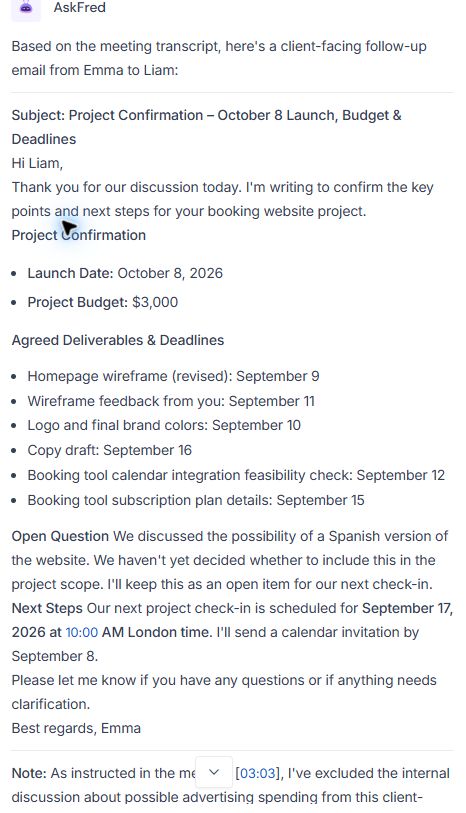
| Check | Original answer | Our correction |
|---|---|---|
| Task owners | Five of six deliverables had no explicit owner. | Name Emma or Liam for each action. |
| Feedback | Assigned to “you,” but the consolidated-feedback requirement was missing. | Ask Liam for one consolidated set of comments. |
| Invitation | Emma and September 8 appeared; Liam-only was not explicit. | State the invitation is for Liam only. |
| Email boundary | An explanatory note followed the signature. | Select only the intended email; omit the extra explanation. |
The email body did not disclose the possible internal advertising spend. The separate note mentioned that discussion while explaining its omission. Copying the entire answer would include that explanation. We did not send the answer, so this is a copying risk we observed, not a sent-message incident.
For the separate note-taking tests and their limitations, see our Fireflies AI review.
04 / A CHECKED EXAMPLE
Example follow-up email after a client meeting
Edited by The Tech Stack Lab. We wrote this version from the original script and answer key. It has not been generated or validated by Fireflies. Dates refer to the fictional September 2026 project.
Subject: Booking website: October 8 launch and agreed next steps
Hi Liam,
Thanks for our discussion. We agreed to launch the booking website on October 8, 2026, replacing October 1. The confirmed project budget is $3,000.
Here are our agreed actions:
- Emma: send the revised homepage wireframe by September 9.
- Liam: review the wireframe and send one consolidated set of comments by September 11.
- Liam: upload the logo and final brand colours by September 10.
- Emma: check whether the booking tool supports the existing calendar by September 12. This is a feasibility check; if it is unsupported, we will discuss alternatives before choosing one.
- Emma: send the copy draft by September 16, replacing September 14.
- Liam: confirm the subscription plan name and limits by September 15.
- Emma: send the next check-in invitation to Liam only by September 8.
The Spanish version remains an open question, with no agreed owner or deadline.
Our next check-in is September 17, 2026, at 10:00 AM London time.
Please let me know if any of these points differ from your understanding.
Best regards,
Emma
We deliberately avoid adding a deadline for the email itself or claiming an integration is working. Neither was agreed. The project budget can be included without repeating the internal discussion that the client asked us to omit.
05 / USE THE STRUCTURE
A ready-to-copy meeting follow-up email
Need the same commitments saved against a sales opportunity? Our meeting notes to CRM workflow connects the checked note, task and recap.
Copy this email into your draft, or replace the bracketed placeholders below before copying. Remove any sections that do not apply. Only include decisions, owners and dates you have checked against your notes.
Editable template · subject line included · no sign-up needed. If a deadline is missing, use “date to confirm”. If no next meeting was agreed, replace that sentence with “Our next check-in is still to be arranged.”
This is our reusable editorial template, not another AI test result. The button copies only the subject line and email text, including any edits you make here. Replace every remaining placeholder and check the recipient before sending.
Need to track the work after the email is sent? Use our meeting action items template to keep owners, deadlines and status together.
Ready to track this follow-up against a sales opportunity? Our SaaS CRM comparison checks what Pipedrive, HubSpot and Close did with saved notes, draft requests and internal tasks.
06 / BEFORE YOU SEND
Check the commitments, not just the grammar
- Every action has a verified owner, or is explicitly marked unresolved.
- Changed dates use the final agreement, with the correct year and time zone where needed.
- Proposals, unapproved spending and feasibility checks remain conditional.
- Internal-only information and the assistant’s extra explanations are outside the email.
- Recipients, links and attachments match the intended audience.
If you need a transcript file for your checking process, inspect your tool’s plan entitlement. Our Fireflies export check encountered a paid gate on a free account. This workflow itself is a structure you can use with manually written notes as well.
Keep the internal record alongside the client email with our meeting minutes template, including decisions, open questions and approval.
Meeting follow-up email questions
What if nobody agreed a deadline?
Write “date to confirm” or ask the owner. Do not turn a suggested date into an agreement.
Should I paste the whole AI answer into an email?
Review the intended email body separately. Our example included an explanatory note after the signature that did not belong in the client email.
Does this template require Fireflies?
No. The tested example used Fireflies, but you can fill in the structure using checked notes or a transcript from another source.