
THE PRACTICAL ANSWER
Keep the note, the task and the email as three separate outputs
To move meeting notes into a CRM, identify the correct deal, save the checked source context, create assigned activities from the agreed actions, and review a customer-safe recap before sending. An AI list of next steps is useful text; check that a real task exists before relying on a reminder.
This guide shows a manual workflow with optional automation, using our Pipedrive test as the worked example. Our Fireflies recording tests and CRM tests used different fictional conversations. We did not connect them or test an automatic Fireflies-to-CRM transfer.
Copy the CRM note template ↓01 / YOUR REUSABLE STARTING POINT
A sales meeting note template for your CRM
Use this after a customer call or demo. It records the opportunity and its next actions; it is not an agenda for an internal sales-team meeting. Keep internal negotiation notes separate from anything you copy to the customer.
- 1. SourceChecked notes and a reference
- 2. DealCorrect record and proposal status
- 3. TaskActual assignee and due date
- 4. DraftCustomer-safe recap for review
Copy the blank CRM meeting note
MEETING CONTEXT Date and timezone: [date / timezone, or not recorded] Participants and roles: [names / roles] Company and exact opportunity: [company / deal] CRM record link or ID: [verified record] Source reference: [original note / approved transcript] Customer goal or problem: [stated goal, or not recorded] COMMERCIAL STATUS Proposed value and currency: [amount / what period it covers] Contract or approval status: [confirmed / proposed / unknown] Unapproved fees or requirements: [details] Forecast close date: [forecast only, unless explicitly agreed] AGREED ACTIONS — ONE LINE PER COMMITMENT [action] | Business owner: [name or unknown] Agreed due date: [date / not agreed] CRM assignee: [actual user responsible for tracking this] Linked activity: [ID / link after saving, or not yet created] Source and changes: [reference / corrected deadline] OPEN QUESTIONS [item] | What remains unconfirmed: [detail] Person to ask: [name / unknown] Do not record a proposed meeting as confirmed. INTERNAL ONLY — EXCLUDE FROM CUSTOMER RECAP [negotiation notes / private context, or none recorded] HANDOFF CHECK Saved note: [link] Saved activities verified: [links / still missing] Customer recap: [draft / reviewed / sent] Do not mark an email sent or a task done before it happens.Download plain text ↓
The template is new editorial material. Its internal-only heading does not enforce CRM access permissions: store sensitive context in an appropriately restricted place.
Already have clean notes and only need an action spreadsheet? Use the meeting action items template. This guide focuses on the handoff into actual CRM records.
02 / CHECK THE DESTINATION
Attach the notes to the opportunity you actually discussed
Match the person, company and deal before adding a summary. One company can have several opportunities; a familiar company name alone does not tell you where a particular conversation belongs. Record the verified deal link or ID in your working note.
In our fictional Northstar case, Alex was considering LabFlow for the whole team at $200 per month, equivalent to $2,400 per year. No contract was signed. We stored $2,400 as proposed first-year recurring revenue and excluded a separate, unapproved $500 onboarding service. These are fictional customer terms, not CRM subscription prices.
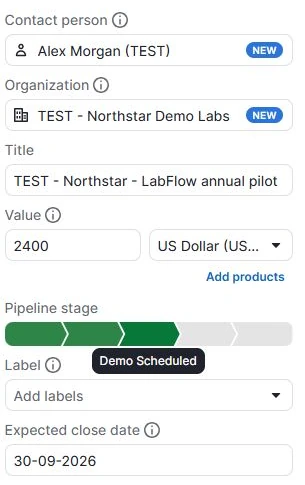
Keep assumptions visible
The September 30 close date was our forecast, not Alex’s promise. The case described a completed demo, but the existing stage we used was labelled Demo Scheduled. We documented that mismatch; the label does not prove a meeting occurred.
Save the source before summarizing it
Retain the checked note and distinguish it from later AI output. Our original fictional source note is available in the shared test method, including the corrected date and unresolved proposals.
Pipedrive’s notes guide explains adding a note to a record. Its deal detail guide describes the record’s notes and activities. Reopen the deal after saving to check the destination.
03 / TRANSLATE COMMITMENTS INTO RECORDS
Separate who promised the work from who tracks it in the CRM
Jamie is the fictional salesperson in our source. The real logged-in test user owned the saved CRM activity. Naming Jamie in an AI answer did not create a Jamie account or assign a task to him.
The table below is our checked interpretation of the source. We saved the proposal/DPA task as a representative manual example; we did not create all four activities. The suggested tracking actions for the other rows are instructions for your own process.
| Source commitment | Final agreed date | CRM handling |
|---|---|---|
| Jamie sends proposal and DPA together | September 11, 2026 | Observed: one manual task saved for September 11, linked to the test deal and owned by the real test user. |
| Alex supplies a dummy-only sample CSV | September 10, 2026 | Suggested: internal owner tracks receipt of dummy records; customer Alex remains the source commitment’s owner. |
| Jamie checks Slack availability on the proposed plan | September 12, 2026 | Suggested: save an internal verification task. Availability remains unconfirmed until checked. |
| Alex confirms pilot-user count | Not agreed | Suggested: record the commitment and track the missing deadline. Any internal reminder date is not an agreed customer deadline. |
For an external customer’s action, assign an internal person to track receipt; do not pretend the customer has a CRM seat. If you set an internal reminder for a task without a deadline, label it as your own check-in date rather than a customer commitment.
Corrected dates and missing dates need different treatment
Jamie’s initial September 9 proposal date was explicitly replaced by September 11. Alex’s pilot-user count, however, was an agreed action with no deadline. Preserve both facts: use the corrected date for the first task and “not agreed” for the second.
In Pipedrive, open the deal’s Activity tab, choose a task, fill in its title, owner, record link and agreed date, then save and reopen it. Check the date, time and timezone displayed. Our representative task had no agreed time. Pipedrive’s activity documentation explains these fields and record links; adding guests can send invitations, so an internal tracking task should not acquire guests by accident.
04 / LET AI PROPOSE, THEN CHECK
The exact prompt we used to retrieve actions from a saved deal note
We ran this in Pipedrive Sales Assistant beta during a Premium trial. The note had already been saved against the named deal. Our interface limited chat input to 300 characters; this is the actual compact prompt, not a rewritten prompt presented as tested.
Copy the tested record-retrieval prompt
Read the notes on the deal TEST - Northstar - LabFlow annual pilot. List the agreed follow-up tasks with their responsible people and final due dates. Flag unresolved proposals separately. Do not create, edit or send anything. Cite which deal or note you used if your interface supports sources.
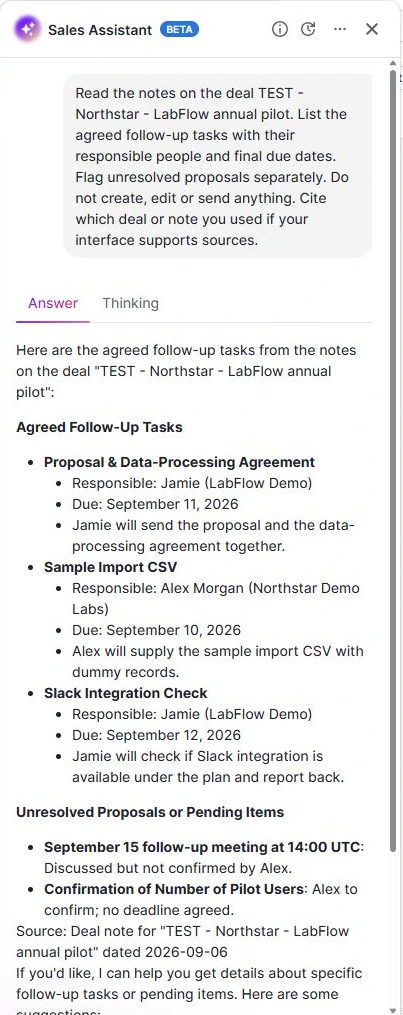
What we checked against the note
- The final proposal date was September 11.
- The CSV and Slack-check dates remained September 10 and 12.
- Alex and the missing pilot-count deadline were retained, but grouped with pending items.
That last grouping is why the source matters. “No deadline agreed” does not mean “no action agreed.” We corrected our interpretation before deciding what should become a task.
The output named a note but did not provide a clickable source citation in this test. Open the source yourself when a statement needs checking. The full Pipedrive assessment records the result and its limits.
05 / PREPARE THE CUSTOMER VERSION
Draft the recap from the checked actions, then remove internal context
Use the same final dates and owners in the task list and customer recap. Keep proposals labelled as proposals. An AI draft should not turn a forecast into a promise, an optional fee into an approval, or an unconfirmed meeting into an invitation.
For our fictional case, this is the short editorially corrected handoff we would use as the basis of the recap. It is not a new model output or a sent message.
Jamie will send the proposal and DPA by September 11. Alex will provide a dummy-only sample CSV by September 10. Jamie will check Slack availability on the proposed plan by September 12. Alex will confirm the pilot-user count; no deadline was agreed for that action.
The $2,400 annual team subscription remains proposed, and the separate $500 onboarding service is not approved. No contract is signed. September 15 at 14:00 UTC is a proposed meeting time awaiting confirmation.
Our original Pipedrive email needed clearer wording for the unapproved fee, the missing deadline and unsigned status. You can inspect it in the review. For a complete message you can adapt, use the copyable follow-up email template.
Our Pipedrive Email tab still required mailbox setup, so the chat draft is not evidence of native email delivery. The later HubSpot check also separated an inspectable draft from the recipient’s sending requirements. Record “draft” until the actual sending step has happened.
06 / AUTOMATE THE REPEATABLE STEP
Start with one internal task rule, then test its repeat behavior
Once the manual handoff is clear, you can evaluate a rule for a predictable next step. In a separate Pipedrive probe, we watched a change into Proposal Made, required the exact test-deal title, and created an internal review task assigned to the test user, due one day after the trigger.
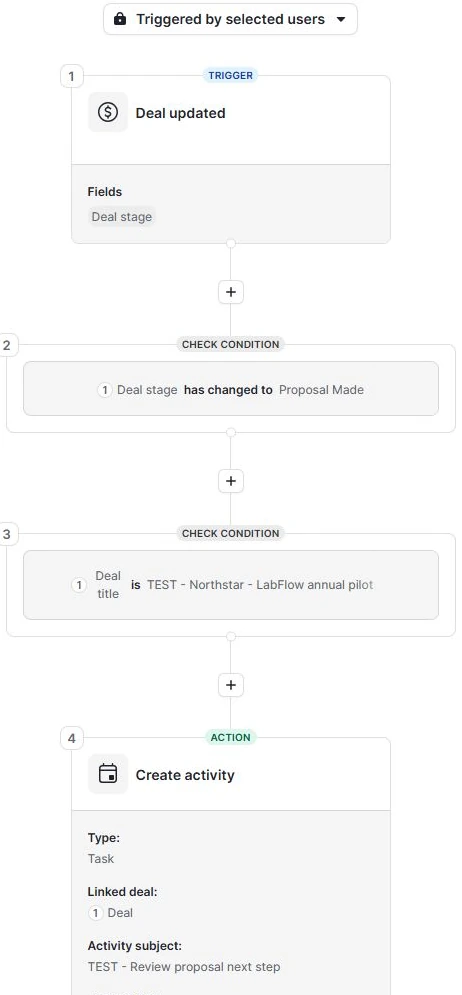
The task was created immediately with a future due date. It was a generic review reminder, separate from Jamie’s September 11 proposal commitment. It did not read the meeting note to calculate that commitment.
| Control | New tasks | What it tells us |
|---|---|---|
| Wrong title enters the stage | 0 | The exact-title condition excluded that input. |
| Matching title re-enters | 1 | The matching transition ran again. |
| Same matching transition repeated | 1 | Another task was created; our rule was not once-per-deal. |
We disabled the rule afterward. If you want one task per deal, your configuration needs a suitable guard and its own repeat tests. Our title condition was an isolated test scope, not a verified production deduplication design. Read the full controls and screenshots.
Meeting-tool integrations introduce another handoff: the exported note must arrive at the intended record and any created task must be inspected there. We did not test such a connector here. Choose a plan and verify the exact integration before calling the workflow automatic; the CRM package comparison explains why a working manual process does not establish automation access.
07 / BEFORE YOU CLOSE THE TAB
A six-point handoff check
- Right record: company, person and exact opportunity match the conversation.
- Source preserved: the original checked note remains identifiable.
- Agreements separated: final dates, undated commitments and unresolved proposals retain their different meanings.
- Activities reopened: actual assignee, due date, timezone and deal link are correct; missing activities remain explicitly uncreated.
- Customer version reviewed: no internal negotiation note, invented approval or accidental invitation.
- Status is accurate: a draft is still a draft; an open task is still open; repeat-trigger behavior is known before scaling a rule.
If the team has no CRM yet, use our three-CRM SaaS shortlist to pick a trial. If your problem is the quality of the recorded input, start with the Fireflies notes and action-item tests.
What this walkthrough is based on
Our AI assistant operated Marvin Smit’s Pipedrive Premium trial on September 6–7, 2026, using a prewritten fictional sales case. The case’s conversation was dated September 7; the first test was run September 6. This article reuses those original records, outputs and screenshots. It is not a fresh trial or a real customer meeting.
The blank template, action-to-record mapping and corrected recap are editorial material. The observed manual task and separate automation run are identified explicitly. No recording-to-CRM integration, outbound customer email, migration or long-term reliability test was completed.
The public Pipedrive guides for notes, deal details and activities were checked September 7. Our testing method explains how we distinguish product claims, observed results and editorial recommendations.
Questions about moving meeting notes into a CRM
Does saving an AI meeting summary create CRM tasks?
Do not assume so. Our read-only retrieval prompt returned a list; a task was saved separately. A connector may offer task creation, but verify the resulting records and the behavior of your exact configuration.
What if no deadline was agreed?
Keep the action and its owner, but record the deadline as not agreed. An internal reminder can have its own date, clearly distinguished from a customer commitment.
Can I use this with HubSpot or another CRM?
The note structure and review checks are reusable. Record association, task fields, permissions and automation differ by product. Our HubSpot Free test includes a manually saved task; it does not establish the same paid workflow as Pipedrive.
Is this a tested Fireflies-to-Pipedrive integration?
No. The recording and CRM trials used separate fictional inputs. This guide demonstrates the manual CRM handoff and a separate internal task rule, not a connected transcription-to-CRM pipeline.