
OUR TAKE
Is Close CRM worth trying?
We would shortlist Close for a sales team that needs to turn saved deal context into clear next actions. In our Scale trial, Chloe Chat correctly listed all four agreed tasks, including a corrected date and an action without a deadline. A separately configured workflow created the expected internal task.
The email was less complete: it needed another prompt, omitted an open commercial question and required a billing check. Our recommendation is to trial that specific workflow with your own dummy case. We did not test calling, dialers or a working inbox connection.
See Close plans ↗One fictional scenario, operated by our AI assistant in Marvin’s account. Standard provider link; no affiliate tracking.
01 / THE SHORT VERSION
Close CRM pros and cons from our test
What worked
- Lead, contact, opportunity and original notes stayed together.
- Chloe retained all four task owners and final dates, with the missing date explicit.
- The customer draft excluded the internal discount.
- A configured workflow created an internal task with the expected next-day deadline.
What needed attention
- The first email request led to a sender clarification, not an email body.
- The final draft left out the unresolved $500 onboarding service.
- Our Google connection was disabled at the final check; sync remains unverified.
- The entry plans do not include the workflow feature we tested.
These are results from one controlled case. Four recovered actions are useful evidence, but they do not establish an overall AI accuracy rate or predict a team’s sales results.
02 / GET THE CONTEXT RIGHT
A lead held the company; an opportunity held the sale
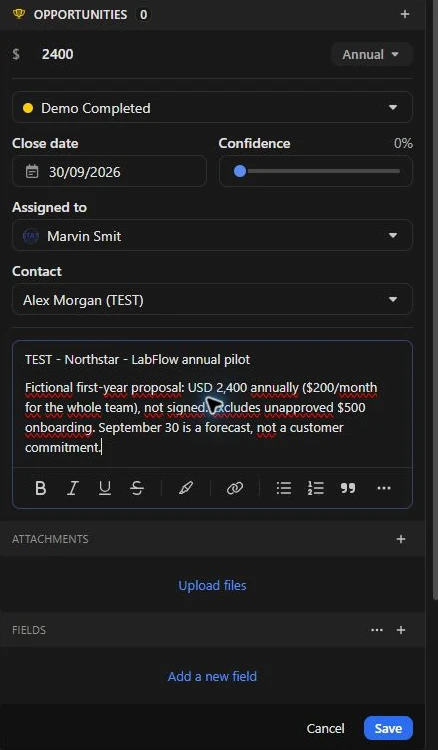
We created the fictional company Northstar Demo Labs as a lead, added Alex Morgan as its contact and saved a $2,400 annual opportunity in Demo Completed. The original meeting notes sat separately on the lead’s activity history.
Use a name the assistant can find
The creation form we used had no separate opportunity-name field. We put the exact test title in its Note field and also used it in the original meeting-note heading. Our prompts then referred to that title.
Keep proposed value separate from approval
The customer was considering $200 per month for the team, or $2,400 per year. No contract was signed. A separate $500 onboarding service was discussed but not approved, so we excluded it from the opportunity value.
The form also displayed a confidence control. We left its default untouched; it is not an AI prediction or a score from our test.
Check the connection, not just the account name
A Google account appeared in settings, but its final status was Disabled. We did not validate email or calendar sync. If the inbox is central to your process, checking an actual synced dummy message should be part of your trial.
03 / CHLOE CHAT BETA
Four agreed actions, including the one with no deadline
Our source note included a deliberately corrected deadline: Jamie first offered September 9, then changed it to September 11. It also mixed agreed work with an unconfirmed meeting, an unverified integration and an unresolved fee.
| Agreed action | Owner | Expected final date | Observed |
|---|---|---|---|
| Proposal and data-processing agreement | Jamie | September 11 | Owner and corrected date retained |
| Dummy import CSV | Alex | September 10 | Owner and date retained |
| Check Slack availability on the proposed plan | Jamie | September 12 | Check retained; capability not assumed |
| Confirm pilot-user count | Alex | No deadline agreed | Kept as an agreed task with no invented date |
That last row matters. An action can be agreed even when its deadline is missing. Chloe kept it in the agreed-task list and separated the unsettled commercial and scheduling questions.
Its source references linked back to the lead record. We did not see a direct link to the specific note passage. Our read-only prompt requested text, so this answer did not create saved tasks. We created a representative proposal task separately and checked its September 11 date.
The official Chloe Chat guide describes a beta assistant that can use CRM context and perform supported actions with approval. Our read-only test evaluates retrieval, not every action Chloe can take. For a reusable way to record the results, use our meeting action items template.
04 / REVIEW BEFORE SENDING
The follow-up email needed another prompt and two commercial checks
We asked for an email from fictional Jamie to fictional Alex, with actions, dates, proposed terms and unresolved questions. Chloe first asked whether it should save a draft under the real account owner because Jamie was not an available sender. We requested plain text in chat instead; no CRM email draft or message was sent.
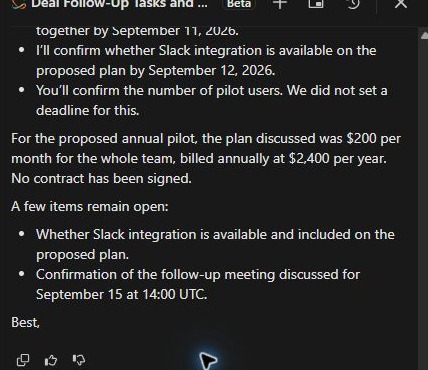
The resulting draft preserved all four actions, kept the three dates, marked the pilot-user deadline as unset and excluded the internal 10% discount.
- Restore the open fee. The full email omitted the separate $500 onboarding service. Our source explicitly said it was discussed but not approved.
- Confirm billing cadence. The draft said “billed annually.” Our record contained an annual value, but the original meeting note did not explicitly agree an invoice schedule. Annual contract value should not silently become a customer billing commitment.
The saved text also ended at “Best,” without Jamie’s name. That is a small edit, but another reason to inspect the actual body before using it.
A safer commercial paragraph
The proposed team plan is $200 per month, or $2,400 per year. No contract has been signed, and the billing schedule still needs confirmation. The separate $500 onboarding service was discussed but has not been approved.
This paragraph is our editorial correction, not additional Chloe output. Our opportunity metadata also used annual wording, which may have reinforced the draft’s interpretation. Clear source data matters alongside checking the answer. For the complete reusable structure, copy our client follow-up email template.
05 / FROM AN ANSWER TO A SAVED TASK
One matching update created the next-day task
After the AI requests, we configured a separate workflow for this isolated opportunity. It watched opportunity creation or updates and required both Proposal Sent status and a Note field matching the exact test title.
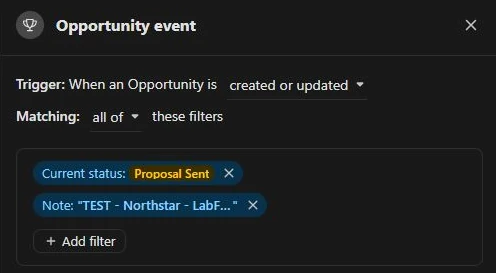
We shortened the opportunity’s metadata Note to that exact title before activation. The separate original meeting note remained intact. The action was an internal review task, due in one day and assigned to Marvin.
Moving Demo Completed to Proposal Sent produced one Finished run. The lead then held two tasks: the manual proposal task plus the newly created review task. We archived the workflow after checking the result.

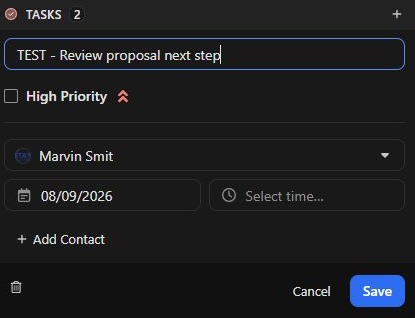
Check the date on the actual task
The generated task was due September 8, one day after the September 7 trigger. It was created immediately with that future deadline; the workflow did not wait a day before creating it.
This was not a once-per-deal rule
Our trigger checked the current state on creation or update. We did not test repeated updates, stage re-entry or a non-matching record in Close. One successful run does not establish duplicate prevention. Test those paths before applying a rule to real leads.
06 / COUNT THE SEATS AND THE EXTRAS
Close CRM pricing: monthly and annual costs in USD
Official list prices checked September 7, 2026. Annual equivalents describe an annual subscription, not a month-to-month offer. Our test used a Scale trial.
| Plan | Monthly billing per user / month | Annual equivalent per user / month | 1 user per year | 5 users per year |
|---|---|---|---|---|
| Solo | $19 | $9 | $108 | Not available: one user only |
| Essentials | $49 | $35 | $420 | $2,100 |
| Growth | $109 | $99 | $1,188 | $5,940 |
| Scale Tested tier | $149 | $139 | $1,668 | $8,340 |
Annual totals are our calculations: annual equivalent × 12 × seats, not checkout quotes. Source: Close pricing and plan comparison.
For our automated task, budget from Growth. Solo and Essentials exclude automated workflows. We tested Scale, not a separate Growth account. At the captured annual rates, five Scale seats cost $2,400 more per year than five Growth seats.
Chloe Chat is not the same as metered AI usage
Close’s AI credits guide lists Chloe Chat across plans without consuming AI credits. Voice agents, enrichment and other metered AI features are separate. Native email tools such as AI Rewrite, Smart Reply and Draft Assist start at Growth; our chat-based email test was not a native-composer test.
Budget in three parts: seats, calling/SMS/phone-number usage, and any metered AI features. Included AI credits reset monthly and do not roll over. We did not test voice agents or calculate a calling bill. The base table is therefore a starting point, not an all-in operating-cost quote.
07 / WHICH ACCOUNT SHOULD YOU TRY?
Close vs Pipedrive and HubSpot
Try Close when clear retrieval from saved notes is your main question. Its handling of the agreed action without a deadline was a useful result in this case. Reuse the prompts below and check your own output before drawing a broader conclusion.
Compare Pipedrive for a deal-to-task process. Our Pipedrive review covers a linked deal, chat recap and configured task rule. It also includes exclusion and repeat controls that we have not yet run in Close. Neither product’s chat draft was ready to send without checking.
Consider HubSpot if a free starting point is essential. Our Free account handled records, retrieval and a manual task, but automation was upgrade-gated. We did not evaluate its paid workflows against Close Scale. The CRM comparison for SaaS teams puts the three tested accounts side by side.
Five things to check in your Close trial
- Store one representative dummy opportunity and clarify annual value, billing terms and unapproved fees.
- Ask for actions with owners and final dates. Include one corrected date and one genuinely missing deadline.
- Inspect the final customer email, including omitted questions and any sending-identity clarification.
- Test an internal task rule with matching, non-matching and repeated updates; inspect actual task dates and duplicates.
- Verify the inbox connection and chosen paid tier. Price the seats and usage your team will actually need.
This is a suggested trial checklist. It includes checks beyond the single case we completed.
Our HubSpot Free review covers the linked records, undated-task issue and the boundaries we encountered before any upgrade.
08 / REPRODUCE THE TEST
Our method and the exact Close prompts
On September 7, 2026, our AI assistant operated Close’s web interface in Marvin Smit’s Scale trial, with Chloe Chat beta. We used a prewritten fictional SaaS case and an answer key kept outside the product. We preserved the outputs before assessing them. This review expands the same case used in our CRM comparison; it is not a second independent trial.
We completed lead/opportunity setup, read-only retrieval, an email request plus a plain-text follow-up, a manual task and one workflow trigger. No outbound email, customer meeting or paid checkout took place. Calling, voice agents, live sync, imports, reporting and long-term team use remain untested. Screenshots are crops of original captures; product text has not been rewritten.
Copy prompt 1: retrieve actions from the saved notes
Save the source notes first and replace the fictional deal title.
Read the notes on the deal TEST - Northstar - LabFlow annual pilot. List the agreed follow-up tasks with their responsible people and final due dates. Flag unresolved proposals separately. Do not create, edit or send anything. Cite which deal or note you used if your interface supports sources.
Copy prompt 2: the original customer email request
This first request produced a sender clarification in our session.
Using this deal’s original notes, draft an email from Jamie to Alex: final actions, owners, dates, proposed terms and unresolved questions. Omit internal notes. Invent no dates, approvals or capabilities. Draft only: send nothing and create no invitation.
Copy prompt 3: request plain text after the sender question
Use in the same conversation so the previous constraints remain available.
Show the subject and full email body here in chat as plain text, written from fictional Jamie to fictional Alex. Do not create a CRM email draft, change the sender, send anything, or create an invitation. Keep all the constraints from my previous prompt.
See the shared fictional sales case and our testing and evidence standards for the wider context.
Close CRM questions
How much does Close CRM cost per month?
Our September 7 USD table above distinguishes monthly subscriptions from lower annual equivalents. Count your seats first: Solo is restricted to one user, and the automated workflow we tested requires a higher tier. Then add applicable usage.
Can Chloe turn meeting notes into follow-up tasks?
Our read-only request recovered four tasks from a saved note, but did not create them. A separate configured workflow created a task. Inspect saved records rather than assuming an AI list is already scheduled work.
Is Close better than Pipedrive for a small SaaS team?
Our single case cannot establish a universal winner. Close grouped the undated action more clearly; both customer drafts needed editing. Pipedrive has additional repeat-control evidence in our review. Use the comparison and trial checklist to choose a test that reflects your process.
Did you test Close’s calling or voice agents?
No. Our evidence covers saved CRM notes, a chat-generated email and internal tasks. A calling-led purchase needs a separate test of connection quality, workflows and actual usage costs.
Sources and dates
Original Close test, public homepage capture and USD pricing check: September 7, 2026. Feature documentation checked the same day. Interpretations and calculated team costs are ours. Beta access and plan packaging may change.