
OUR TAKE
Is Pipedrive worth a trial?
Yes, if your immediate need is keeping deals and their next actions together. In this Pipedrive review, our Premium trial completed a narrow but useful sales workflow: linked records, a checked recap and a rule-created task. The AI draft needed human edits.
We would shortlist it for a small team selling through demos and proposals. If you need a permanent free starting point, compare our HubSpot Free findings. If your decision depends on bulk imports, reporting or a working inbox integration, use the trial checklist below: those were outside this test.
See Pipedrive plans ↗One fictional scenario plus follow-up controls, operated by our AI assistant in Marvin’s account. Standard provider link; no affiliate tracking.
01 / THE DECISION IN BRIEF
Pipedrive pros and cons from our test
What we liked
- Contact, organization and deal could be linked in one form.
- Sales Assistant recovered the three dated actions, including a corrected deadline.
- The chat email kept the internal discount out of the customer recap.
- A separately configured stage-change rule created the expected next-day task.
What needs attention
- The draft softened an unapproved fee into an optional extra and left the missing deadline implicit.
- The chat had a 300-character input limit in our session.
- AI text did not itself become a scheduled task.
- Re-entering the proposal stage created another task; our rule was not limited to one task per deal.
02 / START WITH THE RECORD
Adding a deal: the useful part was the context
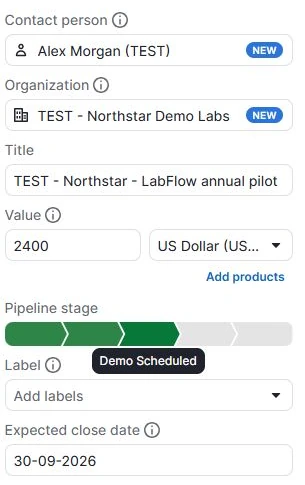
Our fictional customer, Northstar Demo Labs, was considering a $2,400 annual subscription. We entered Alex as the contact, linked the company, set the deal value and saved the source notes. This gave the later task and AI requests a single deal to refer to.
Three setup details we would keep
Give the deal a specific name. Our retrieval prompt used its exact title. A clear naming convention makes it easier to distinguish two opportunities at the same company.
Agree what the value means. We stored the proposed first-year subscription, excluding an unapproved $500 onboarding fee. A number in the pipeline is not proof of a signed contract.
Map stages deliberately. The case described a completed demo, but the available stage we used was Demo Scheduled. We recorded that mismatch rather than treating the label as evidence that the demo had happened.
03 / SALES ASSISTANT
Pipedrive AI: task retrieval and follow-up drafts
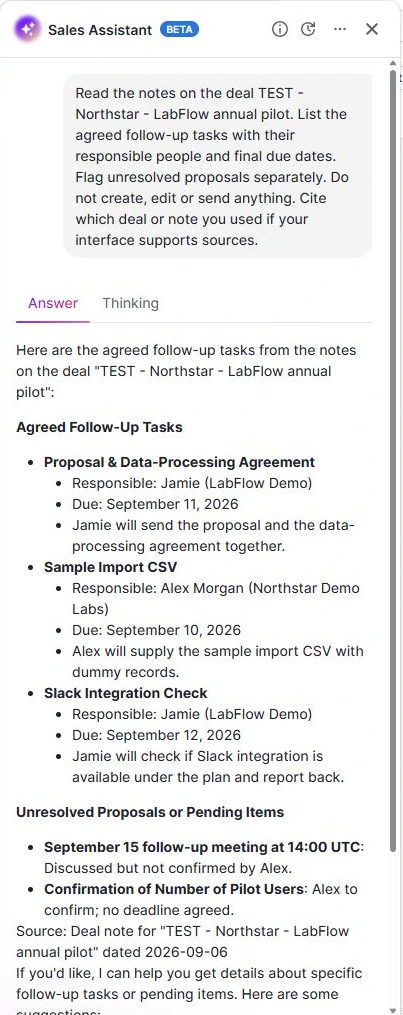
Our source note deliberately included a changed deadline: Jamie first offered September 9, then corrected it to September 11. It also contained an agreed action without a due date and several proposals that were still unconfirmed.
The corrected date survived
The answer assigned the proposal and data-processing agreement to Jamie for September 11. Alex’s dummy CSV remained due September 10; Jamie’s Slack availability check remained due September 12.
A task can be agreed without a deadline
Alex had agreed to confirm pilot-user numbers. The assistant retained Alex and the missing date, but placed the action under pending items alongside the unconfirmed meeting. That grouping matters: the team still owes an action even when nobody has agreed when.
Check the actual record
The assistant named the stored deal note and its September 6 date; the fictional call inside the note was dated September 7. We saw no clickable note citation. Read the source rather than treating a source-shaped sentence as a verified link.
The read-only response did not create CRM activities. We saved a representative task separately, with a September 11 deadline.
The follow-up email needed three edits
In the same chat, we asked for a customer email. The draft preserved the dated actions, the $200 monthly team price and the unconfirmed meeting. It omitted the internal 10% discount, as requested.
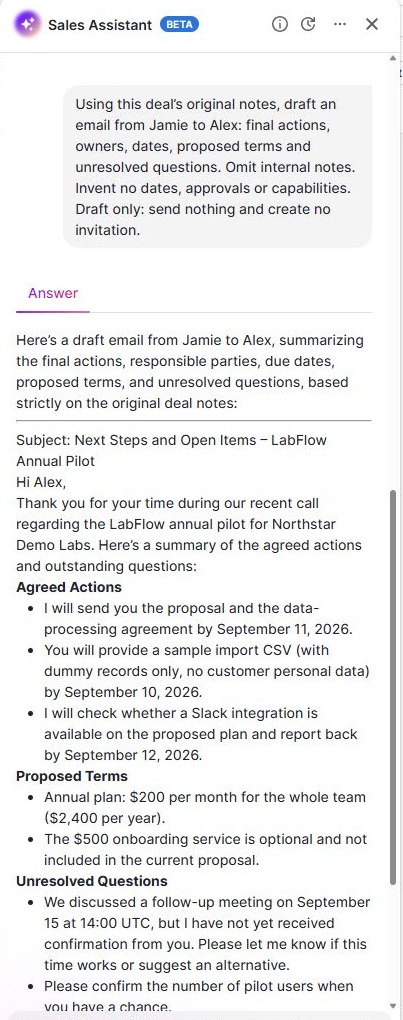
- Make the fee status explicit. The source says the separate $500 onboarding service was discussed but not approved. The draft described it as optional and outside the current proposal.
- Label the missing deadline. Asking for pilot-user numbers at a convenient time avoids inventing a date, but we would clearly say no deadline was agreed.
- Repeat the contract status where needed. The draft called the terms proposed but did not explicitly say no contract had been signed.
A useful draft is a starting point. Our meeting follow-up email template makes those checks part of the writing structure.
Opening the actual email tab
On September 7, we opened Email on the same test deal. Pipedrive showed a Sales Inbox setup form asking us to connect an email account, rather than a working composer. It marked the feature as included with our Premium plan. We therefore verified the setup requirement, but have no native-composer output or mailbox-sync result to score.
Sales Assistant and native email AI are different
The official AI guide lists Sales Assistant beta across plan tiers, subject to availability, while native AI email creation starts at Premium. Our chat test used Premium with the beta enabled. Check the availability of each feature on your intended paid plan.
04 / FROM TEXT TO AN ACTUAL TASK
One stage change created the next action
We configured a separate automation after the AI tests. Its purpose was narrow: create one internal review task when our isolated test deal moved into Proposal Made.
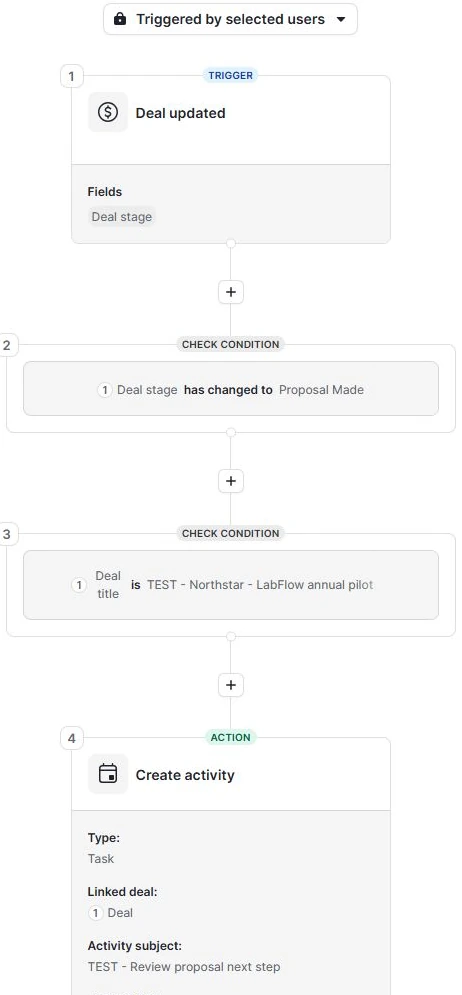
The rule we used
- Watch updates to the deal’s stage.
- Continue when the stage changes to Proposal Made.
- Match the exact test deal title.
- Create an internal Task, linked to that deal, due in one day and assigned to the current test user.
We restricted trigger users to the test account. After moving the test deal from Demo Scheduled to Proposal Made, one review task appeared in its Focus area, due September 7. The manually created September 11 proposal task remained separate.
The task was created immediately with a future due date. This was not a delayed execution a day later. No email or webhook was part of the rule.
We deactivated the automation after that first run, then reopened it for the controlled checks below on September 7.
What happened when we repeated the stage change?
We reused the same fictional deal and rule. First we temporarily changed the title so it no longer matched, then moved the deal out of and back into Proposal Made. After restoring the original title, we repeated that stage transition twice.
| Control | Observed result | New tasks |
|---|---|---|
| Non-matching title enters Proposal Made | Stage condition passed; title condition evaluated False. | 0 |
| Matching title re-enters Proposal Made | One new review task, due September 8. | 1 |
| Matching title leaves and re-enters again | Another review task, also due September 8. | 1 |
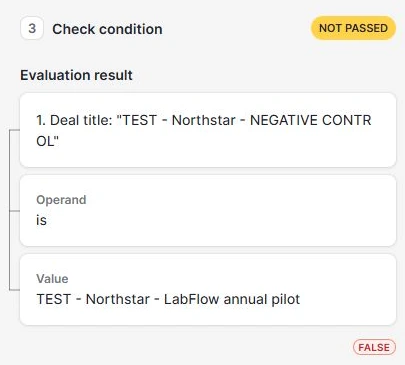
This rule creates a task per matching entry, not once per deal. That follows its configuration; it is not evidence of a platform defect. If deals often move backwards and forwards, decide whether another task is wanted. A once-per-deal process needs an additional guard and its own test.
The final deal contained the original automated task, two new automated tasks and the separate manual proposal task. We restored its original title, left it in Proposal Made and switched the rule off. This checks one excluded title and two re-entries, not every update or duplicate-handling scenario.
For a real rollout, replace our title-based test scope with conditions suitable for your process, then test both a matching and a non-matching record. Check ownership and dates against a written action tracker before enabling a broader rule.
Pipedrive’s current feature table lists automations and if/else steps from Growth. We did not test branching or re-run the rule on Growth, so those are documented capabilities rather than additional test results.
05 / CHOOSE THE PACKAGE, THEN COUNT THE SEATS
Pipedrive pricing in USD: annual plans and team costs
These US dollar list prices were checked on Pipedrive’s official pricing page on September 7, 2026. Annual billing is paid upfront; the monthly equivalent is not a monthly subscription. Our product test used a Premium trial.
| Plan | Annual equivalent 1 seat / month | Annual billing 1 seat | Annual billing 5 seats |
|---|---|---|---|
| Lite | $14 | $168/year | $840/year |
| Growth | $39 | $468/year | $2,340/year |
| Premium Tested tier | $59 | $708/year | $3,540/year |
| Ultimate | $79 | $948/year | $4,740/year |
Derived annual totals = advertised monthly equivalent × 12 × seats. Five-seat totals are calculations, not checkout quotes. Monthly-billed USD offers require a separate check at the provider. Check annual and monthly offers.
The practical upgrade questions
Need email sync or task automation? Both start at Growth in the current documentation. Lite can be considered for basic pipeline work, but our full tested workflow should not be budgeted at the Lite price. We did not connect an inbox. Email sync availability.
Need native AI email creation? That is a Premium boundary in the AI guide. Decide whether you need that composer feature, rather than buying a plan solely because our separate chat assistant generated text.
Need add-ons? The plan table includes LeadBooster, Projects and Smart Docs in Premium and Ultimate, with paid add-on options on Lite and Growth. Campaigns and Web Visitors are separate. We did not test these products or price a bundle. Included and separate add-ons.
For five seats, moving from Growth to Premium at our captured annual rates adds $1,200 per year before tax and extras. List the specific features your team will use before deciding whether that difference is worthwhile.
Annual billing is an annual commitment, not a month-to-month subscription at the lower equivalent rate. Read the billing explanation and check the currency, seat count and renewal terms before paying.
06 / WHEN TO LOOK ELSEWHERE
Pipedrive vs HubSpot and Close
Choosing between these two? Our Pipedrive vs HubSpot comparison puts the original test results, package limits and one- or five-user USD costs together, with a copyable trial scorecard.
HubSpot: our Free account handled linked records, note retrieval and a manual task. Automation was behind an upgrade. A later inbox-connection check recovered the original email preview: its dated actions and commercial caveats were retained, but the undated action lost its owner. See the HubSpot email assessment. It is a relevant starting point if a free account matters, but our test does not compare paid HubSpot workflows with Pipedrive’s Premium trial.
Close: its Scale-trial assistant placed all four actions in the agreed-task list, including the one without a deadline. Its email required an extra prompt and still needed corrections. A separate workflow created a task. We would include it when note retrieval is central to the buying decision. Read our Close CRM review for the setup, exact prompts and complete cost table.
See the Pipedrive, HubSpot and Close comparison for original screenshots and the shared results table. This review explains the Pipedrive steps in more detail; the comparison helps you select which account to trial.
Our HubSpot Free review covers the linked records, undated-task issue and the boundaries we encountered before any upgrade.
07 / MAKE YOUR TRIAL COUNT
Five checks before your Pipedrive trial ends
Ready to turn this into a repeatable process? Follow our meeting notes to CRM walkthrough, with a reusable note template and the distinction between a proposed action and a saved task.
This is an editorial checklist for your next trial, not a claim that we completed every item.
- Recreate one ordinary deal. Use dummy contacts, your actual stage names and the currency your team sells in. Decide whether value represents a year, the whole contract or something else.
- Challenge the recap. Include a corrected deadline, an unapproved fee and an action without a date. Compare the output line by line before judging it useful.
- Inspect the real task. Check assignee, linked deal, due date and timezone. A person named in an AI response is not necessarily an available CRM user.
- Try the failure paths. Test a non-matching deal and a repeated stage update in an isolated setup. Confirm how you will stop the rule and handle unexpected extra tasks.
- Validate your missing requirements. If imports, reports, mobile access, support or inbox sync are essential, exercise them on the plan you intend to buy. Then total seats and add-ons.
08 / EVIDENCE AND EXACT INPUT
How we tested Pipedrive
On September 6, 2026, our AI assistant operated Pipedrive’s web interface in Marvin Smit’s Premium trial. We used a fictional SaaS sale and a prewritten answer key, kept the key outside the product, and preserved the first outputs before assessing them. The source describes a fictional September 7 conversation; the test itself occurred September 6.
The September 6 case included one retrieval request, one email request, one manually saved task and one successful automation trigger. On September 7 we checked native email access, one non-matching title and two matching stage re-entries. These extend the same case used in our CRM comparison; they are not independent customer trials. No real customer meeting, outbound email, paid checkout or integration test took place. Bulk imports, reporting, team adoption and long-term reliability remain outside the evidence; this case does not establish an overall AI accuracy rate.
Copy the exact record-retrieval prompt
Save your notes against the appropriate deal first, then replace the fictional deal title. Our session limited chat input to 300 characters.
Read the notes on the deal TEST - Northstar - LabFlow annual pilot. List the agreed follow-up tasks with their responsible people and final due dates. Flag unresolved proposals separately. Do not create, edit or send anything. Cite which deal or note you used if your interface supports sources.
Copy the exact email prompt
We submitted this after the retrieval request in the same conversation. It asks for draft text only.
Using this deal’s original notes, draft an email from Jamie to Alex: final actions, owners, dates, proposed terms and unresolved questions. Omit internal notes. Invent no dates, approvals or capabilities. Draft only: send nothing and create no invitation.
The longer pasted-notes prompts in our initial protocol were not executed in this interface. You can read the original fictional notes and cross-tool method or our editorial testing standards. Screenshots are inspected crops; product text has not been rewritten. The homepage is a recognition visual, not evidence that its marketing claims were tested.
09 / COMMON QUESTIONS
Questions about Pipedrive
Is Pipedrive any good for a small sales team?
Our limited trial supports shortlisting it for a deal-and-next-action process. The record setup and isolated task rule worked; the AI email still needed edits. See the test scope before applying these findings to a larger rollout.
What are the downsides of using Pipedrive?
In our test, chat input was limited, an agreed task was grouped with pending proposals and the email needed clearer wording. For budgeting, email sync and automation start above Lite, while native email AI starts at Premium. Check beta availability and add-ons against your actual needs.
Is Pipedrive free?
The public pricing page offers a 14-day trial, rather than a permanent free plan. Our account was a Premium trial. Confirm the offer and post-trial terms before signing up; our price examples describe paid base subscriptions.
Does Pipedrive AI create tasks automatically?
Our read-only prompts returned text. We separately created a manual task and configured a workflow that created another task after a stage change. Do not assume an AI task list has become saved activities: inspect the records.
Which Pipedrive plan did you test?
Premium, with Sales Assistant beta enabled. Public documentation lists some tested capabilities on lower tiers, but we did not repeat the case on those tiers. Native email AI and our chat-based draft are different features.
Sources and dates
Original product test: September 6, 2026. Follow-up email-access and automation controls, USD annual pricing, homepage capture and official documentation check: September 7. Recommendations are our interpretation of the preserved test, not vendor endorsements.