
OUR TAKE
Is HubSpot Free enough for a small sales process?
It is a useful starting point if you can manage follow-up manually. In this HubSpot CRM review, our Free account handled the linked records, saved notes and a dated task without a paid trial. Breeze retrieved the three dated commitments correctly, including a revised deadline.
We would test it for a solo operator or two-person team building a shared record of sales conversations. Here is the practical boundary from our account:
Needs setup
Email required a connected sender. The recovered draft still needed an action-owner correction.
See the email check →Requires an upgrade
Our deal-automation entry was locked. Confirm the exact paid features.
See the upgrade boundary →One fictional case, operated by our AI assistant in Marvin’s account. Standard provider link; no affiliate tracking.
01 / WHAT TO WEIGH UP
HubSpot CRM pros and cons
The strongest reason to start: a shared history of the contact, company, deal and next action, without committing to a paid trial.
The main trade-off: you still need to check the details. Breeze found an undated action but classified it too cautiously; the task form added a time that the customer had not agreed. The examples below show both.
02 / CONTACT, COMPANY AND DEAL
Setting up a fictional sale without importing customer data
We used Northstar Demo Labs as a fictional company and Alex Morgan as its contact. The proposed sale was a $2,400 annual team subscription. We saved the original meeting note on the deal, so Breeze had to retrieve context rather than receive the entire note pasted into chat.
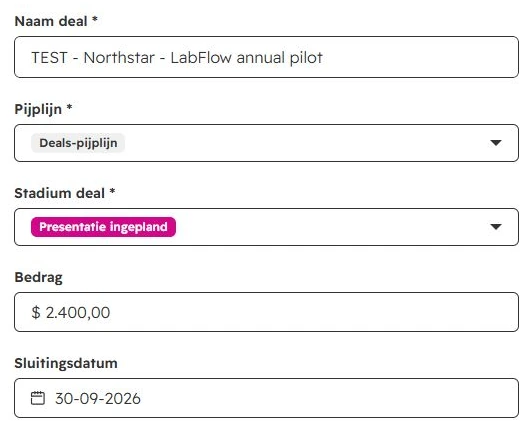
Stage names need interpretation
Our case described a completed demo, but the existing stage we selected was Presentation scheduled. We recorded that imperfect mapping. A stage label should not change what actually happened in the conversation.
Check automatic associations
Using a dummy address at example.com also created an example.com company automatically. We created the intended test company separately and checked its links to both contact and deal. That small surprise is worth looking for when you first add contacts.
September 30 was our internal close forecast. The customer had not signed, and the separate, unapproved $500 onboarding service stayed outside the deal value.
Our account used a Dutch interface and EU hosting. The article is in English; captions explain the original Dutch screenshots. We skipped personal email connection during onboarding and completed the record setup manually.
03 / RETRIEVING THE NEXT ACTIONS
Breeze kept the corrected deadline, but the task grouping needed a fix
The source note deliberately changed Jamie’s proposal deadline from September 9 to September 11. It also included three unresolved proposals and one agreed action with no date. This lets us inspect more than whether a summary sounds plausible.
| Action | Expected owner and date | Observed result |
|---|---|---|
| Send proposal and DPA | Jamie · September 11 | Correct owner and final date; September 9 was not reused. |
| Provide dummy import CSV | Alex · September 10 | Owner, date and dummy-data restriction retained. |
| Check Slack availability on the plan | Jamie · September 12 | The check was retained without claiming the integration works. |
| Confirm pilot-user count | Alex · no deadline agreed | Action and missing date found, but grouped with non-definitive follow-up. |
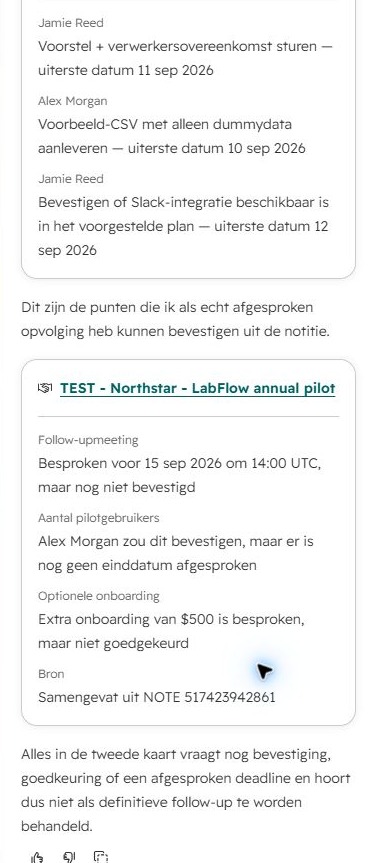
An unset deadline does not cancel an agreement
Alex had agreed to confirm the number of pilot users. Only the deadline was missing. Breeze put that action in a second card with unresolved items, then cautioned that the card should not be treated as definitive follow-up. That wording was too broad.
Our correction is simple: retain Alex’s action in the agreed-task list and mark its deadline as not agreed. Keep the proposed meeting and unapproved fee in a separate questions list.
The original note remained the reference
Breeze identified the deal and a specific note ID as its source. Its answer was in Dutch despite the English prompt. We checked the complete rendered response against the saved note.
The response was read-only and did not create saved activities. Use an action tracker with separate owner and deadline fields to check what still needs to become an actual task.
The official Breeze Assistant guide lists availability across products and plans, with additional requirements for some features. Permissions, AI settings and connected accounts can affect what it can do. Our result covers this retrieval request, not every Breeze feature.
04 / THE RECOVERED EMAIL DRAFT
The draft kept the dates and terms, but lost an action owner
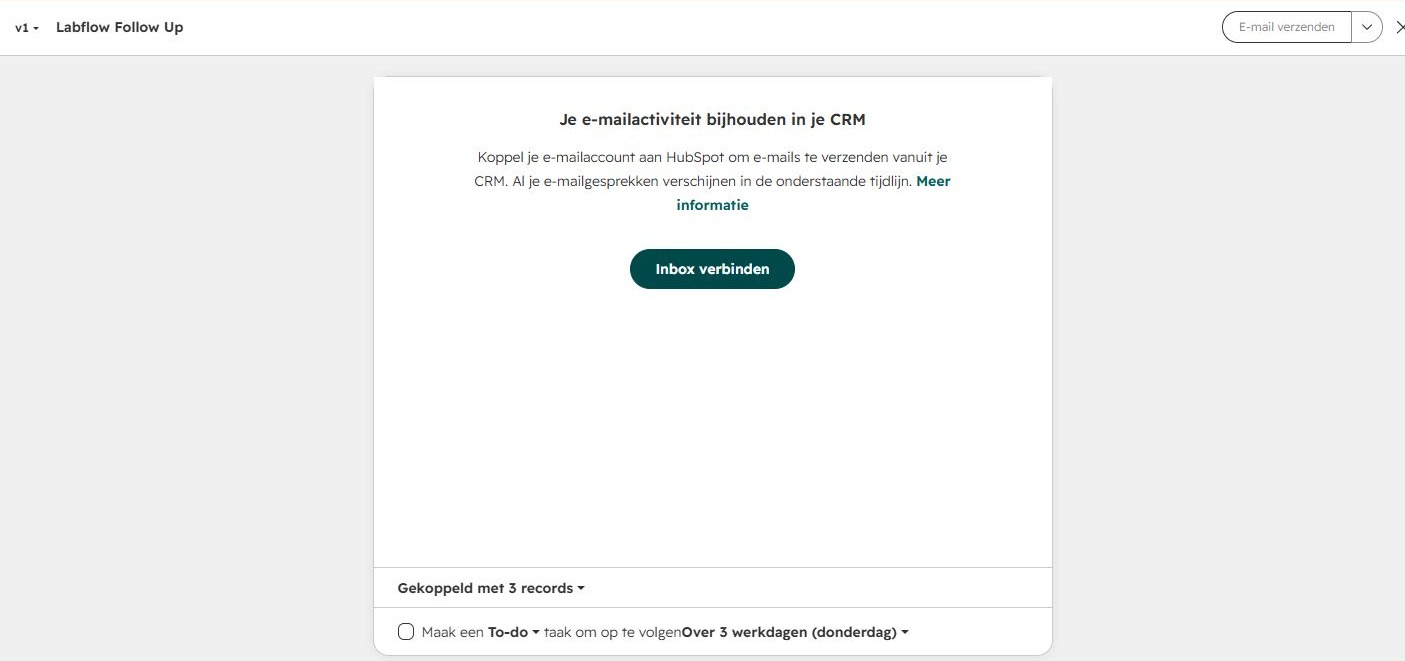
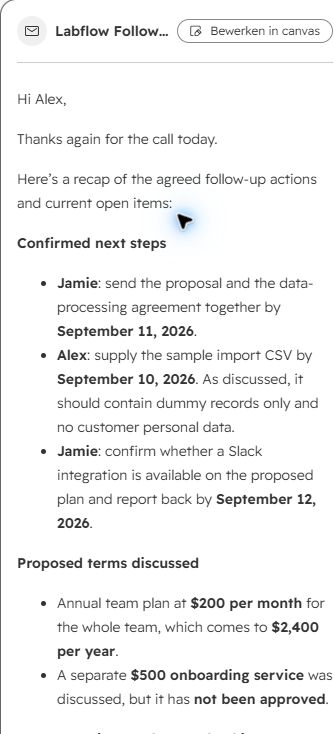
Our first attempt stopped at an inbox-connection screen. Later on September 7, with Marvin’s permission, we connected Gmail and reopened the original Labflow Follow Up v1 artifact. Its body was readable in the chat preview. We assessed that same version without asking Breeze to regenerate it.
See the original inbox-connection boundary
What the original email got right
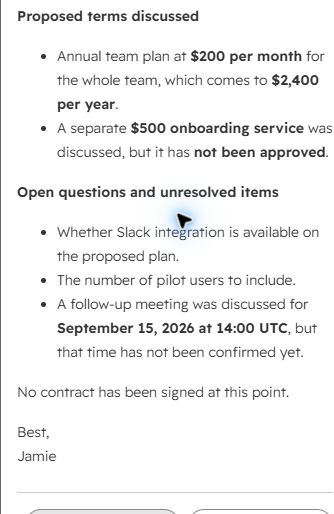
It retained the final September 11 proposal-and-DPA deadline, the September 10 dummy CSV and the September 12 Slack check. The proposed team price remained $200 per month / $2,400 per year. The $500 onboarding service stayed unapproved, the September 15 meeting stayed unconfirmed, and the email explicitly said no contract had been signed.
The internal 10% discount was absent from the complete recovered body. September 30 was not presented as a customer commitment. These are results from this artifact, not a guarantee that another draft will handle private notes correctly.
The sentence we would add
The original only listed “The number of pilot users to include” under open questions. It lost the fact that Alex had agreed to confirm it. Our editorial correction is:
Alex: confirm the number of pilot users. No deadline was agreed for this action.
That sentence is our correction, not a second Breeze result. Our copyable follow-up email template gives you the same owner-and-deadline structure for checking your own drafts.
A readable draft is not a completed sending test
We had to select the connected Gmail address in the canvas’s From field; it initially retained the unconnected account address. The canvas then showed a contact subscription/legal-basis requirement and kept Send disabled. We did not change the fictional contact’s consent status or send the customer draft. The subject shown was “Follow-up and next steps”; the body assessment above comes from the original chat artifact preview.
Optional inbox automation remained off. During mailbox connection HubSpot displayed a connection-test email step; this is separate from the unsent fictional customer draft. Mail delivery and ongoing inbox sync were not evaluated.
05 / SAVED TASKS AND THE UPGRADE BOUNDARY
The manual task worked; automation remained untested
We manually saved the proposal-and-DPA task with September 11 as the final deadline. Jamie was the fictional business owner in the text; the current test user was the actual CRM assignee. A name in meeting notes does not automatically become a licensed user.
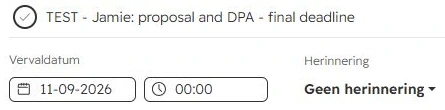
Clearing the time field resulted in 00:00. We documented in the task that the conversation agreed only a date, not midnight. Check the saved deadline and timezone before treating a task notification as an agreed customer commitment.
Why we did not claim a successful automation
The account’s suggested deal automations were locked and labelled as available with Starter. Opening the workflow entry led to an upgrade offer. We did not start a paid trial, configure a rule or trigger an automated task.
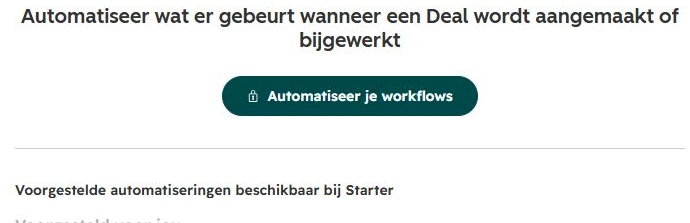
The general workflow documentation lists Professional and Enterprise subscriptions. Our Starter-labelled suggestion screen is a different piece of evidence. Check the exact trigger, conditions and actions in your offer; a broad “automation included” label is not enough to establish that a particular rule will work.
Before upgrading, confirm that your package supports the intended trigger, assignee and deadline, then test repeat updates for unwanted duplicate tasks.
06 / FREE LIMITS AND UPGRADE COSTS
HubSpot Free limits and Sales Hub pricing in USD
Free is a real plan, not the paid trial we used for the other CRMs. HubSpot’s public CRM page, checked September 7, lists $0 access for up to two users and 1,000 contacts, with no expiration date.
Our account’s billing overview also confirmed Free and two users, but described a limit of 3,000 records. Records and contacts are not interchangeable limits. We have not reconciled that account wording into a universal entitlement, so check your own limits before importing a database.
Public Sales Hub catalogue reference
These are September 7 USD starting rates from the official product catalogue, not our account’s promotional offer. Professional and Enterprise require the appropriate Sales seats for full functionality.
| Edition | Starting rate 1 seat / month | 5-seat monthly reference* | Required one-time onboarding |
|---|---|---|---|
| Starter | $20 | $100 | Not specified in this catalogue entry |
| Professional | $100 | $500 | $1,500 |
| Enterprise | $150 Billed annually | $750 Annual commitment | $3,500 |
*Our calculation: unit rate × 5. Confirm billing frequency and your order. These are neither checkout quotes nor verified annual-discount offers.
For example, five Professional seats at $100 for twelve months plus $1,500 onboarding total $7,500 before extras. That is a budgeting scenario at the catalogue rate, not a quoted first-year bill.
Why your account may show different packages
Our logged-in account displayed a different package layout, seat terminology and a temporary promotion. We have not converted that offer into USD or treated it as a public Sales Hub price.
HubSpot also publishes a limited-release pricing supplement for participating customers, with Core and Front Office seats. Our display used similar terminology; that alone does not confirm enrollment. Ask which catalogue and seat model govern your offer before comparing totals.
List the exact paid feature you need, identify who needs that seat, and check onboarding, renewal and additional usage together. A Free pilot tells you whether the basic process is useful; it does not settle the cost of a larger rollout.
07 / PICK THE NEXT TEST
HubSpot vs Pipedrive and Close
Choosing between these two? Our Pipedrive vs HubSpot comparison puts the original test results, package limits and one- or five-user USD costs together, with a copyable trial scorecard.
Start with HubSpot Free when your first goal is linked records and manual follow-up within its user limits. That is the part of the process our account completed without upgrading.
Compare Pipedrive if you want to trial a deal-to-task rule alongside an inspectable chat email. Our Pipedrive review includes a Premium trial, a corrected email and repeated stage-change controls. Its paid-tier access makes this a different starting budget from HubSpot Free.
Compare Close if your immediate question is extracting actions from saved notes. In our Close CRM review, Chloe kept the undated action in the agreed-task list. Its email still needed commercial corrections, and its separate workflow test used a Scale trial.
The three-CRM SaaS comparison shows the shared scenario and limits side by side. These are not equal-budget tests or a comprehensive ranking of the paid products.
Before you move a team into HubSpot
- Check users and record/contact limits in the account you will actually use.
- Add a dummy contact, company and deal; inspect any automatic associations.
- Ask Breeze to handle a changed date and a task without a deadline.
- Inspect a saved task’s assignee, date, time and reminder.
- With an appropriate test inbox, inspect the full customer email before evaluating its quality.
- If automation is essential, confirm the exact package and test matching, non-matching and repeated updates.
08 / EXACT INPUTS, LIMITED CLAIMS
How we tested HubSpot Free
On September 7, 2026, our AI assistant operated the web interface in Marvin Smit’s newly created Free account. We used the same fictional SaaS sale as our Pipedrive and Close tests. The answer key was prepared beforehand and kept outside the product. This article expands the preserved case from our CRM comparison, including a later inbox-connection check of the original email artifact. It is not a second independent AI test.
We saved records and original notes, ran retrieval and email prompts, tried a plain-text workaround, saved one manual task and documented the upgrade screen. The later check connected an authorized Gmail mailbox with optional inbox automation off. HubSpot displayed an automatic connection-test email step. We did not buy a subscription, run paid automation, import real contacts, send the fictional customer draft or create an invitation. Live meeting capture, reporting, migrations and long-term reliability remain untested.
Copy prompt 1: retrieve agreed actions from the deal
Save the original notes first, then replace the fictional deal title.
Read the notes on the deal TEST - Northstar - LabFlow annual pilot. List the agreed follow-up tasks with their responsible people and final due dates. Flag unresolved proposals separately. Do not create, edit or send anything. Cite which deal or note you used if your interface supports sources.
Copy prompt 2: the original customer email request
This produced the original v1 artifact. Its canvas was initially inbox-gated; we assessed the recovered chat preview after the later connection check.
Using this deal’s original notes, draft an email from Jamie to Alex: final actions, owners, dates, proposed terms and unresolved questions. Omit internal notes. Invent no dates, approvals or capabilities. Draft only: send nothing and create no invitation.
Copy prompt 3: the plain-text workaround that did not resolve it
We preserve this unsuccessful follow-up so you can distinguish the first request from the workaround.
Show the full subject and email body here in chat as plain text. Do not use an email canvas or require an inbox connection. Use the original deal notes and the same drafting constraints. Do not send anything or create an invitation.
Find the complete fictional source note in our comparison and the evidence standards on our methodology page. Screenshots are cropped originals, with translations in the surrounding text. The UI itself has not been translated or recreated.
HubSpot CRM questions
Is HubSpot CRM really free?
Yes. Our test used a confirmed Free account, and the public CRM page lists a free plan without an expiry date. It has limits; check the user/contact figures and the separate account wording discussed above. Paid sales capabilities are not automatically included.
What are the downsides of HubSpot CRM?
The main trade-off is the checking and configuration work between a useful CRM record and a reliable next action. Start with our Free overview and the undated-task example.
Does HubSpot Free include Breeze Assistant?
Our Free account could use Breeze to retrieve saved CRM notes. Official documentation lists broad availability with extra requirements for some features. That does not mean every AI agent or action is included without further setup or cost.
Can HubSpot replace a meeting recorder?
This test does not answer that. We supplied a saved fictional note; HubSpot did not record or transcribe a call for us. For a separate recording-input test, see our Fireflies AI review.
Sources and dates
Original Free-account test and homepage capture: September 7, 2026. Public limits, USD catalogue and feature sources checked the same day. Recommendations and calculated examples are our interpretation of that evidence.